


Oracle Cloud EPM 26.11 REST endpoints: paths, payloads, and curl
The published 26.11 REST paths for insight detail, dashboards, the worklist, access logs, and connections, with payloads and curl to run them.
Share on LinkedIn
Oracle published the 26.11 REST reference pages. When I wrote part 1, every reference link in the readiness notes returned a 404. On November 18, 21 of the 22 links load, and the Help Center REST book is now edition G42939-14.
This part is the paths, the request bodies, and curl. Every request below comes from the reference pages. The responses in the terminal screenshots are Oracle's documented samples, not output from a client pod, so read them for the shape of the JSON and not the values.
All of the commands are in one script in the companion repo. The snippets below are lines from that script.
Setup
Every call uses Basic auth against the base URL, which is the service URL without /epmcloud. Starting with 26.11, the user name can't carry the accountName. prefix, so send the plain login.
export EPM_URL="https://<base-url>"         # service URL without /epmcloud
export EPM_USER="[email protected]"  # no accountName. prefix from 26.11 on
export EPM_PASS="<password>"
export EPM_APP="Vision"

APP="${EPM_APP:-Vision}"
PLAN="$EPM_URL/HyperionPlanning/rest"
AUTH=(-sS -u "$EPM_USER:$EPM_PASS")
JSON=(-H "Content-Type: application/json")

enc() { jq -rn --arg v "$1" '$v|@uri'; }
The enc helper URL-encodes a dashboard or connection name, so Revenue Review goes out as Revenue%20Review. You need jq for that and for a couple of the request bodies.
Get Insight Details
GET /HyperionPlanning/rest/v3/applications/{application}/insights/{insightId}The insightId is the insight's external UUID. The reference page says internal numeric insight ids are not accepted. That settles the question from part 1. The numeric id that Get Insights returns, like 426, gets a 400 here.
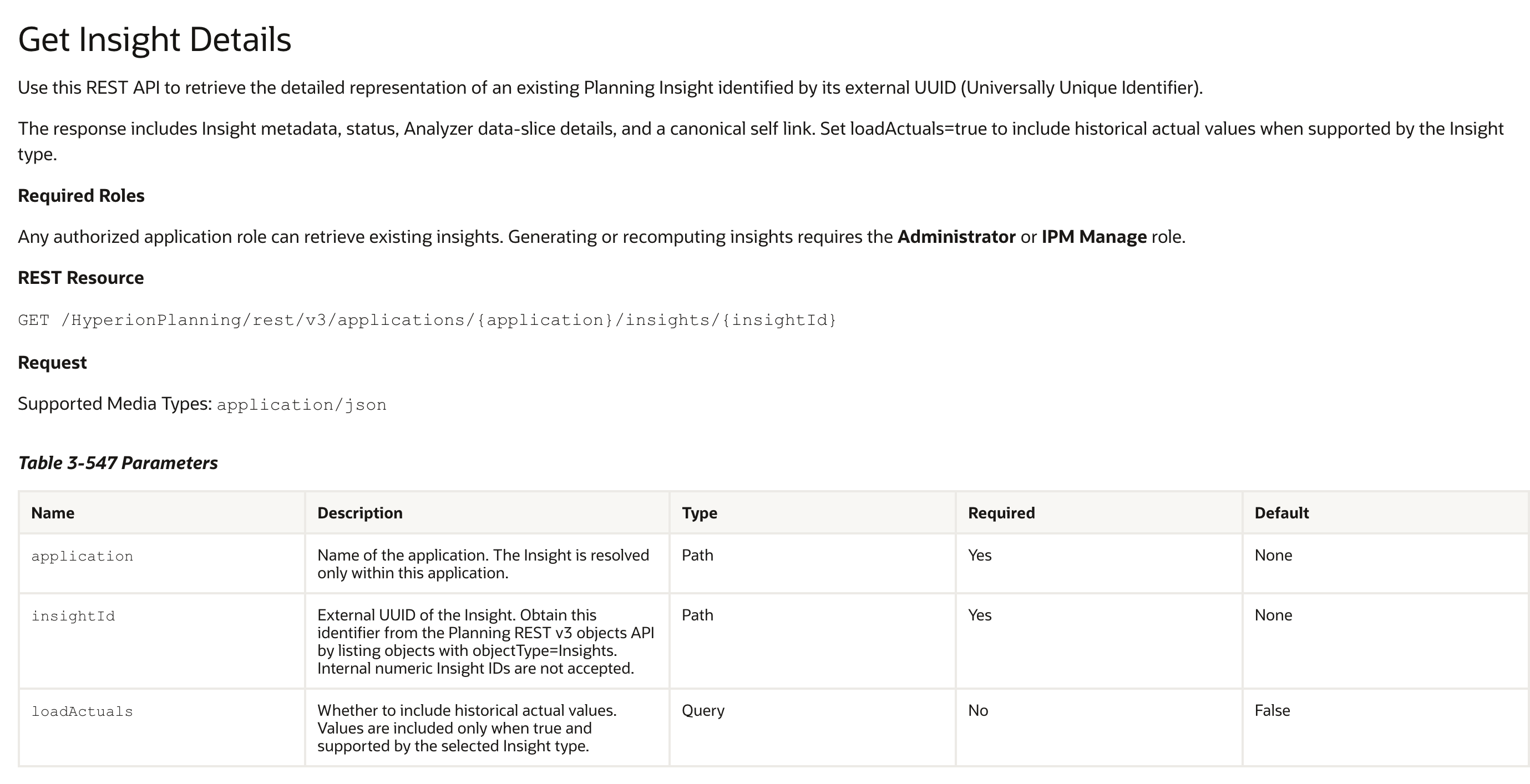
Read the insightId row. The UUID comes from the v3 objects API, and numeric ids are rejected.
To find the UUID, the page points at the v3 objects API with objectType=Insights.
curl "${AUTH[@]}" -G "$PLAN/v3/applications/$APP/objects" \
  --data-urlencode 'q={"objectType":"Insights"}' \
  --data-urlencode 'fields=id,name,objectType'
Two things about that call. The Query Application Objects page doesn't list Insights as an object type yet, so the one line on the insight page is the only documentation for this filter. Query Application Objects also requires Service Administrator, while Get Insight Details lets any authorized application role read an existing insight. A planner can read an insight by UUID but can't list the UUIDs this way.
Then read the insight. loadActuals=true adds historical actuals when the insight type supports them.
curl "${AUTH[@]}" "$PLAN/v3/applications/$APP/insights/$INSIGHT?loadActuals=true"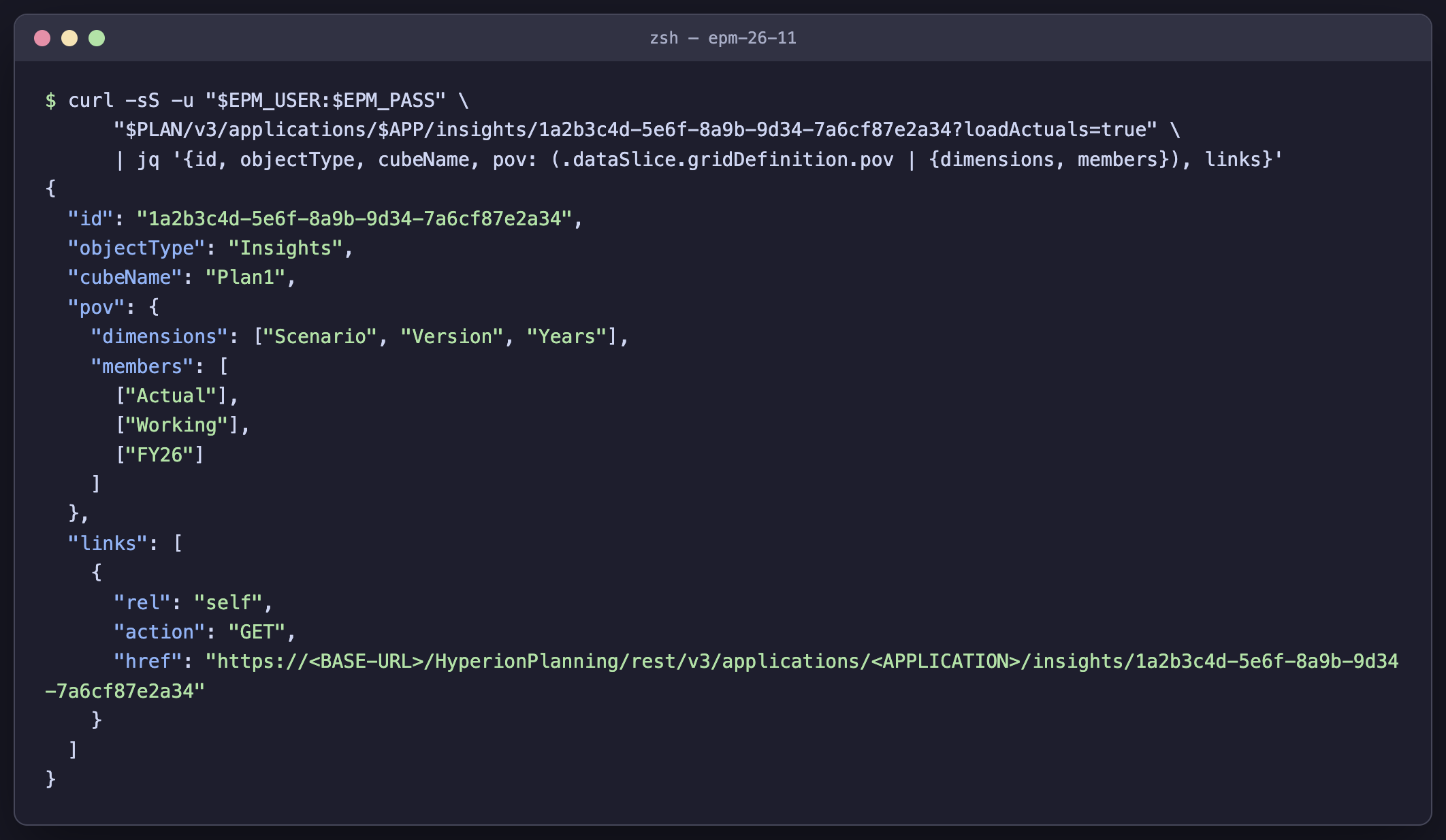
The same request piped through jq to keep the POV and the self link. The body is Oracle's sample, so the UUID and members are placeholders.
The full response also has name, insightDesc, insightType, insightStatus, and the whole Analyzer grid under dataSlice.gridDefinition, with rows, columns, suppression flags, and the prediction calendar name. In each POV, row, or column segment, the members, exclude, and excludeAll arrays line up by index with dimensions.
Watch the 404. Oracle returns 404 when the application doesn't exist, when the insight doesn't exist, and when the caller can't see it. That's on purpose, so nobody can probe for insights they can't access. With that said, a 404 in a script doesn't mean the insight is gone. It can mean the account you're calling with can't see it.
Execute Insight Analysis
In part 1, I said to hold off on executeInsightAnalysis until Oracle documented it. It's documented now.
POST /HyperionPlanning/rest/v3/applications/{application}/insights/{insightId}/action/analyzeIt needs Service Administrator. The body picks the method with insightAnalysisMethod, either KEY_CONTRIBUTOR_ANALYSIS or VARIANCE_DECOMPOSITION_ANALYSIS. The display labels Key Contributor Analysis and Variance Decomposition Analysis also work. A Key Contributor request takes that one property and nothing else. Any other property gets a 400.
curl "${AUTH[@]}" "${JSON[@]}" -X POST \
  "$PLAN/v3/applications/$APP/insights/$INSIGHT/action/analyze?includeGenAiSummary=false" \
  -d '{"insightAnalysisMethod":"KEY_CONTRIBUTOR_ANALYSIS"}'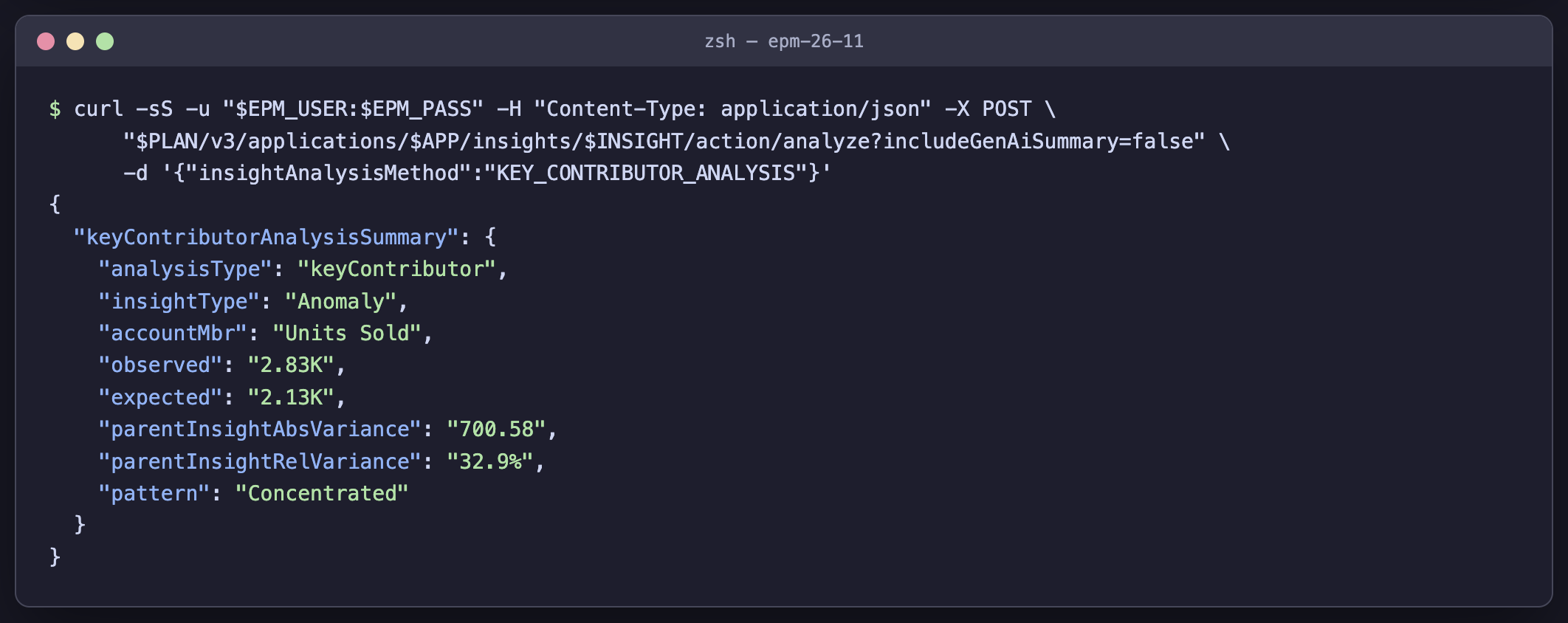
Oracle's sample Key Contributor response. Units Sold came in at 2.83K against 2.13K expected, a 32.9 percent variance with a concentrated pattern.
Variance decomposition needs a relationshipType and the account members that feed it:
- Price Volume Mix takes
volume,price, or both. - FX/Constant currency takes
fxplusvolumeorprice. - Margin takes
totalCostplus at least two ofvolume,price, andgrossRevenue.
You can't send the target account. Planning reads it from the saved insight. The optional decomposition property takes a displayPath from a saved Key Contributor run, so you can decompose one contributor instead of the whole insight.
curl "${AUTH[@]}" "${JSON[@]}" -X POST \
  "$PLAN/v3/applications/$APP/insights/$INSIGHT/action/analyze" \
  -d "$(jq -n --arg v "$VOLUME" --arg p "$PRICE" \
    '{insightAnalysisMethod: "VARIANCE_DECOMPOSITION_ANALYSIS",
      relationshipType: "Price Volume Mix", volume: $v, price: $p}')"
Two query parameters are worth knowing. includeGenAiSummary adds the generated narrative when one is available, and it defaults to false. fields trims the response to paths like keyContributorAnalysisSummary.observed or vdaAnalysisSummary.decompositions.effects.
When Key Contributor Analysis finds nothing, the call still returns 200, with a details message that says "No Key Contributors are found for this Insight." Check the body for details before you parse the summary.
Dashboard definitions and dashboard data
Oracle published eight dashboard pages, not nine. Get Dashboard Data is gone. Its link in the readiness note is still a 404, and the section table doesn't list it. Export Dashboard Data is the read.

The Dashboard Definitions and Data section on November 18. Get Dashboard Data is not in it.
Every path starts with /HyperionPlanning/rest/v3/applications/{appname}. Note that the definition calls use dashboarddefinitions and the data calls use dashboards.
| Call | Method and path | Role |
|---|---|---|
| Create Dashboard Definition | POST /dashboarddefinitions | Service Administrator, or any role with the Interactive User granular role |
| Get Dashboard Definition | GET /dashboarddefinitions/{idorname} | Same as create |
| Update Dashboard Definition | PATCH /dashboarddefinitions/{idorname} | Same as create |
| Update Dashboard Component | PATCH /dashboarddefinitions/{idorname}/components/{componentkey} | Same as create |
| Replace Dashboard Definition | PUT /dashboarddefinitions/{idorname} | Same as create |
| Delete Dashboard | DELETE /dashboarddefinitions/{idorname} | Same as create |
| Export Dashboard Data | POST /dashboards/{idorname}/exportdata | Service Administrator |
| Import Dashboard Data | POST /dashboards/{idorname}/importdata | Service Administrator |
Oracle says every one of these calls supports "the current Planning dashboard artifact." Legacy dashboards, infolets, and composite forms are out of scope. I read that as Dashboard 2.0 only, which answers the Dashboard 1.0 question from part 1.
{idorname} takes the dashboard's REST UUID or its name, URL-encoded. Use the UUID in anything you schedule, since a rename breaks a name.
Read and create a definition
Get Dashboard Definition returns the full authoring definition: name, folder, settings, layout, components, and rules. It needs edit access to the dashboard, not just read access.
curl "${AUTH[@]}" "$PLAN/v3/applications/$APP/dashboarddefinitions/$(enc "$DASH")"Create takes the same shape. This is Oracle's example, a line chart and a form grid side by side on a scrollable layout:
{
  "name": "Revenue Review",
  "folderPath": "/Library/Planning",
  "layout": {
    "type": "scrollable",
    "items": [
      { "component": "revenue", "x": 0, "y": 0, "w": 6, "h": 4 },
      { "component": "drivers", "x": 6, "y": 0, "w": 6, "h": 4 }
    ]
  },
  "components": [
    {
      "key": "revenue",
      "title": "Revenue Trend",
      "form": { "id": "{form-uuid}" },
      "visualization": { "type": "line" }
    },
    {
      "key": "drivers",
      "title": "Driver Input",
      "form": { "id": "{form-uuid}" },
      "visualization": { "type": "grid" }
    }
  ],
  "rules": [
    { "id": "drivers", "cube": "Plan1", "calcType": 3 }
  ]
}curl "${AUTH[@]}" "${JSON[@]}" -X POST \
"$PLAN/v3/applications/$APP/dashboarddefinitions" -d @"$FILE"The layout rules are strict. A scrollable layout is a 12-column canvas with 1 to 16 components, and x plus w can't go past 12. An autofit layout takes 1 to 12 components, either from a preset like single, row, column, or grid, or from a split tree up to six levels deep. Send folderPath or parentId for the folder, never both, and the folder has to exist already.
A grid visualization uses native form rendering and shows every cell. Chart visualizations over a form or ad hoc grid stop at 100 rows and 100 columns.
Create returns 201 with the new id, name, and links. It can also return warnings that show a requested value next to the value Planning actually saved. A warning isn't a failure, but read it.
The component keys are what will trip people up.

The keys you send are client keys. Planning saves its own.
The keys in the payload, revenue and drivers, only exist for that request. Planning maps them to its own persisted keys, like 2_0. After a create or a replace, call Get Dashboard Definition and use the returned keys for component updates, export, and import. A replace can change the keys again.
Embedding a form doesn't turn on that form's save rules. To opt in, add a rules entry with calcType set to 3 and id set to the component's client key. That's the rules block in the example above.
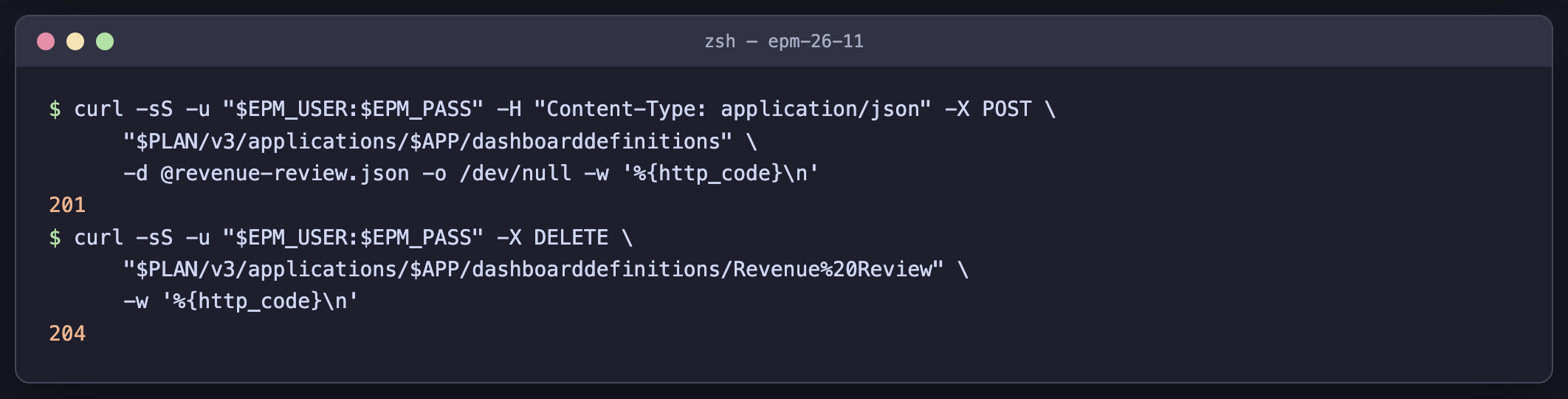
Create returns 201 and delete returns 204, the status codes on the reference pages.
Change one thing at a time
Update Dashboard Definition is a PATCH. Send at least one property, and Planning keeps the layout and components you leave out.
curl "${AUTH[@]}" "${JSON[@]}" -X PATCH \
  "$PLAN/v3/applications/$APP/dashboarddefinitions/$(enc "$DASH")" \
  -d "$(jq -n --arg d "$TEXT" '{description: $d}')"
Update Dashboard Component patches one component by its persisted key. Leave key out of the body, since the URL already names the component.
curl "${AUTH[@]}" "${JSON[@]}" -X PATCH \
  "$PLAN/v3/applications/$APP/dashboarddefinitions/$(enc "$DASH")/components/$KEY" \
  -d "$(jq -n --arg t "$TEXT" '{title: $t}')"
Both return 200. Replace Dashboard Definition is the PUT, and it takes the whole definition. Delete returns 204 with no body.
Export and import data
Export Dashboard Data is the call to be careful with.

Export runs the dashboard's load rules and callbacks. Oracle says not to blindly retry it.
The body is optional selection and POV, all keyed by persisted component key. This is Oracle's example:
{
  "components": ["{returned-component-key}"],
  "globalPov": { "Scenario": "Plan" },
  "componentPov": {
    "{returned-component-key}": { "Entity": "USA" }
  }
}curl "${AUTH[@]}" "${JSON[@]}" -X POST \
"$PLAN/v3/applications/$APP/dashboards/$(enc "$DASH")/exportdata" -d @"$FILE"componentRulePrompts supplies runtime prompt values for the component rules. A processed export returns 200 even when some components fail, so check the aggregate state, which is SUCCESS, PARTIAL_SUCCESS, or FAILED, and then each component's status.
Import only works on writable, form-backed components. Each entry in components needs a persisted key and a dataGrid. The body can also carry globalPov, formPage, rulePrompts, and dashboardRulePrompts. The page says dataGrid "follows the form import contract" and doesn't show one, so I don't have a sample import body to give you yet.
curl "${AUTH[@]}" "${JSON[@]}" -X POST \
  "$PLAN/v3/applications/$APP/dashboards/$(enc "$DASH")/importdata" -d @"$FILE"
A 201 is not proof that anything saved.
Import can return 201 with FAILED in the body. A later component failing doesn't roll back the components that saved. Before Save rules run, and a Before Save failure can stop the save. Read status or importStatus on every component, plus callbackFailures and dashboardRuleFailures. Don't verify an import by calling export unless you're fine running the load rules again.
One note for Groovy. Dashboard-level Groovy rules don't get operation.grid. Form and component Groovy callbacks do.
Dashboards in a repo
With get and replace, you can keep dashboard definitions in git and promote them without a snapshot. I would check two things first. Components point at forms by UUID, and I haven't confirmed a form keeps the same UUID from test to prod. The destination folder also has to exist on the target pod before the create.
Worklist and worklist summary
GET /HyperionPlanning/rest/tmgr/v1/worklist
GET /HyperionPlanning/rest/tmgr/v1/worklist/me
GET /HyperionPlanning/rest/tmgr/v1/worklistsummary
GET /HyperionPlanning/rest/tmgr/v1/worklistsummary/me
These sit under Task Manager in the REST book. All four pages list Service Administrator as the required role, including the two /me calls.
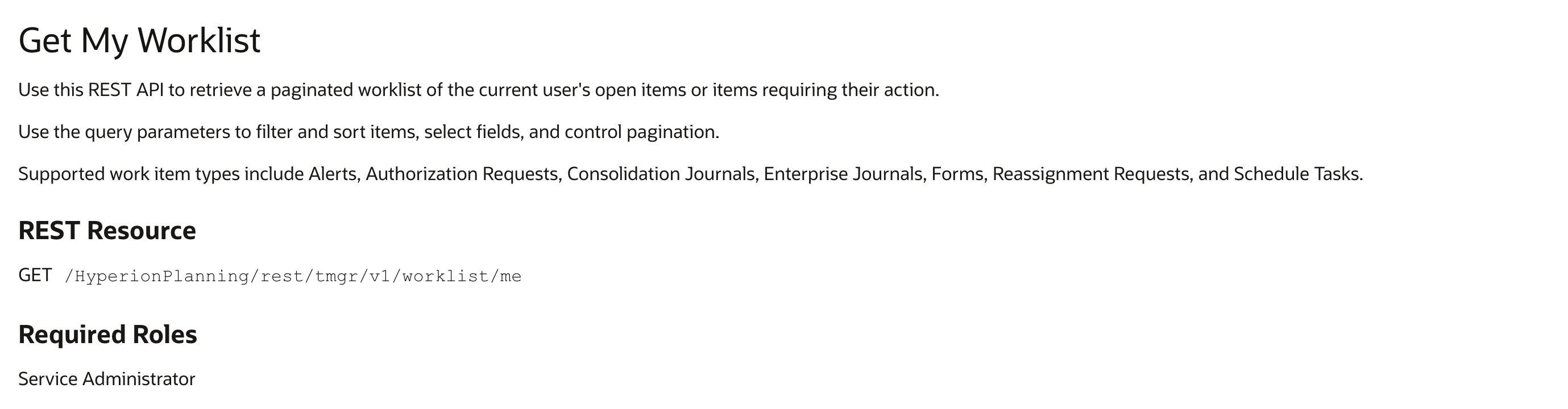
Get My Worklist, with Service Administrator as the required role.
That doesn't fit the Get Worklist page, which says a non-administrator gets only the items in workflows they take part in. If you plan to call /me as an end user, test it with a non-admin account first.
The list calls take the same query parameters:
$filteron name, description, endDate, status, detailstatus, source, year, or period$sortByon the same fields$offset, default 0$limit, default 25$fieldsfrom id, name, description, endDate, status, detailstatus, source, year, period, and due$includeTotalItems, default false
The source constants are ALERTS, AUTHORIZATION_REQUESTS, JOURNALS, ENTERPRISE_JOURNALS, FORMS, REASSIGNMENT_REQUEST, and SCHEDULE_TASKS. The due field comes back as Late, Today, or Seven Days.
The pages list the filter fields but never show $filter syntax. I left $filter out of the script until I can test one.
Put the parameter names in single quotes. In double quotes, the shell expands $limit to nothing.
curl "${AUTH[@]}" -G "$PLAN/tmgr/v1/worklist/me" \
  --data-urlencode '$fields=id,name,source,year,period' \
--data-urlencode '$limit=25'curl "${AUTH[@]}" "$PLAN/tmgr/v1/worklistsummary/me"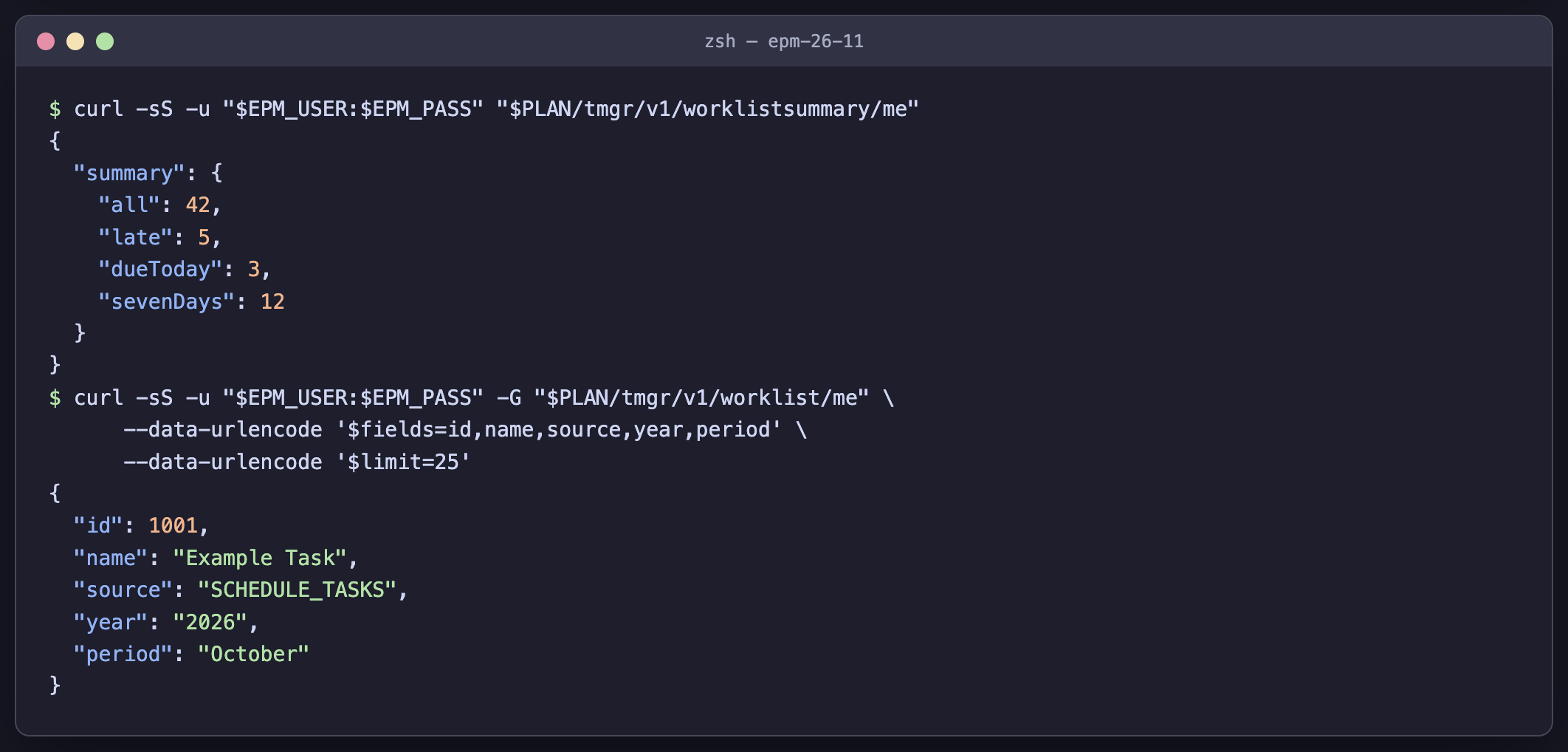
Oracle's samples. The summary has four counts. The worklist sample shows one item, not the list wrapper, so check a real response before you parse it.
The pages don't name business processes. The readiness note said FreeForm and Planning, while the item types include consolidation journals and enterprise journals, and the page names still start with trcs_. Same caveat as part 1. Test it on your own business process before you build on it.
Activity reports and access logs
POST /interop/rest/v2/activityreports/list
POST /interop/rest/v2/activityreports/latest
POST /interop/rest/v2/activityreports/{reportId}
POST /interop/rest/v2/accesslogs/list
POST /interop/rest/v2/accesslogs/latest
POST /interop/rest/v2/accesslogs/{accessLogId}
All six are POST, and all six are read-only. Service Administrator, Power User, User, and Viewer can call them. The pages list the media type as multipart/form-data, but Oracle's own curl samples send JSON with Content-Type: application/json. I followed the curl samples.
The list calls take an optional fromDate and toDate as RFC 3339 timestamps and a sortOrder of asc or desc, which defaults to desc. An empty {} lists everything. The ids that come back are opaque. You can't pass a repository path in their place.
curl "${AUTH[@]}" "${JSON[@]}" -X POST \
  "$EPM_URL/interop/rest/v2/accesslogs/list" -d '{}'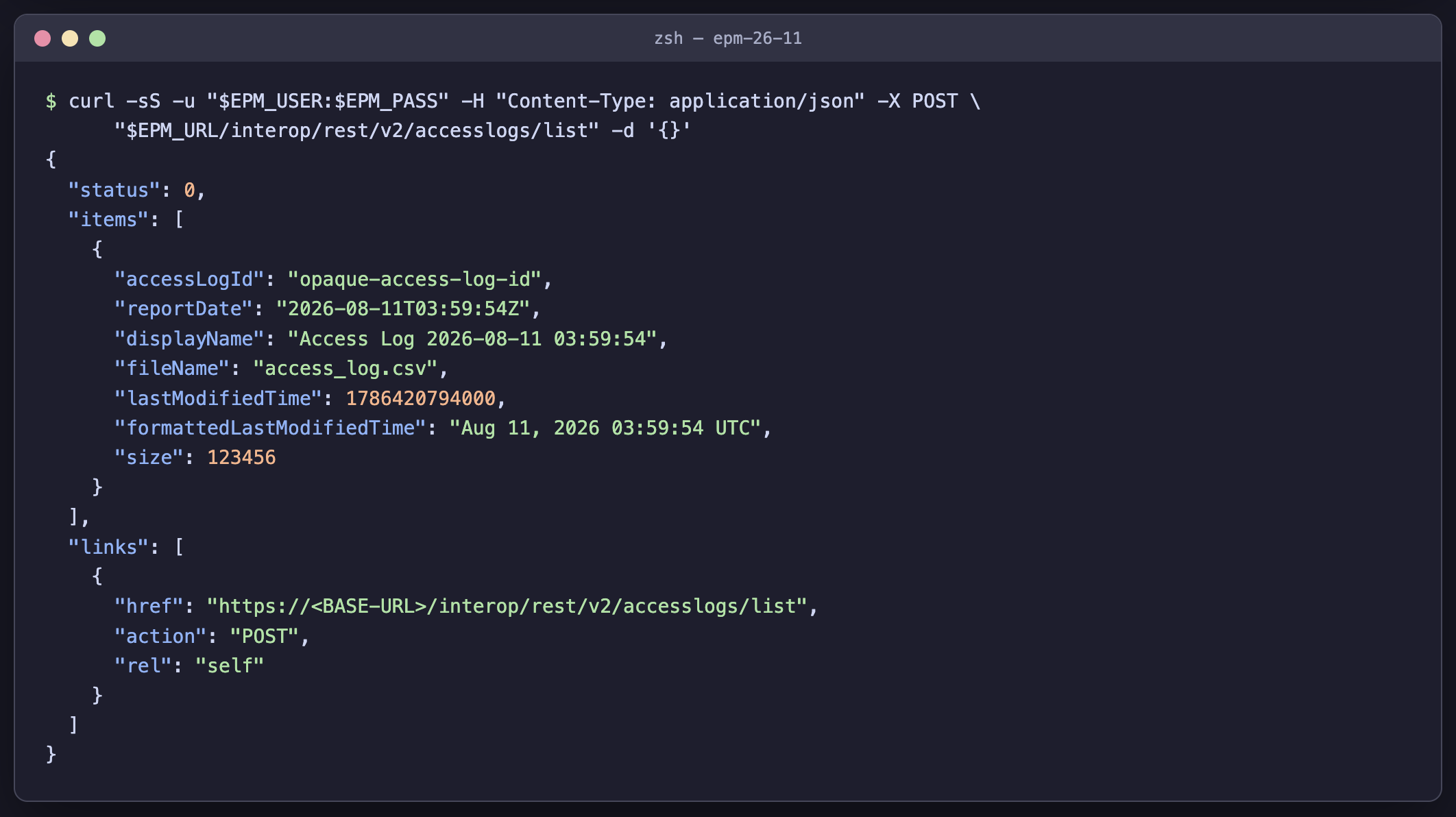
Oracle's sample. Each access log is an access_log.csv with an opaque id.
Get Activity Reports returns the full activityreport.json content for the latest report or one report by id. Get Access Log Records returns CSV. Its body can filter on fromDate, toDate, user, screen, and action, and a record has to match every filter you send. Planning converts the dates to the report's time zone before it compares them to the CSV's Date and Time columns. When nothing matches, you get a 200 with only the header row.
curl "${AUTH[@]}" "${JSON[@]}" -X POST -o access_log.csv \
  "$EPM_URL/interop/rest/v2/accesslogs/$LOG" \
  -d "$(jq -n --arg u "$LOG_USER" 'if $u == "" then {} else {user: $u} end')"
Errors come back with status -1 and a type of EPM_ACCESS_LOG_NOT_FOUND, EPM_ACCESS_LOG_INVALID_REQUEST, or EPM_ACTIVITY_REPORT_NOT_FOUND.
Connections
POST   /HyperionPlanning/rest/epm/v2/applications/{application}/connections
GET    /HyperionPlanning/rest/epm/v2/applications/{application}/connections/{connectionRef}
PUT    /HyperionPlanning/rest/epm/v2/applications/{application}/connections/{connectionRef}
DELETE /HyperionPlanning/rest/epm/v2/applications/{application}/connections/{connectionRef}
All four need Service Administrator. If you set up connections by hand for EPM REST from Groovy, these let you create the same thing from a script.
Create classifies the connection with providerCategory, and each category allows certain authType values:
EPMorNSEPMwithBASICtakesusernameand exactly one ofpasswordorencryptedPassword. Planning validates the target before it saves anything.EPMorNSEPMwithOAUTH2takes anepmOAuth2block.ERPisOAUTH2only, with anerpOAuth2block holding the token URL, client id, scope, certificate, and private key.EXTERNALisOTHERonly, with an optional user name and password,headers, andqueryParameters.
The name is limited to 25 characters and has to be unique in the application. providerType is rejected on create. encryptedPassword takes a password encrypted by EPM Automate, so a script never has to hold the plain one.
{
  "name": "Vision Planning Basic",
  "description": "Planning target connection",
  "url": "https://example-epm.oraclecloud.com/HyperionPlanning",
  "providerCategory": "EPM",
  "authType": "BASIC",
  "username": "[email protected]",
  "password": "<PASSWORD>"
}curl "${AUTH[@]}" "${JSON[@]}" -X POST \
"$PLAN/epm/v2/applications/$APP/connections" -d @"$FILE"Get takes the UUID or the name. There is no list call. The response never includes passwords, OAuth settings, or secured header and query values. A secured value is left out entirely, not masked.
curl "${AUTH[@]}" "$PLAN/epm/v2/applications/$APP/connections/$(enc "$CONN")"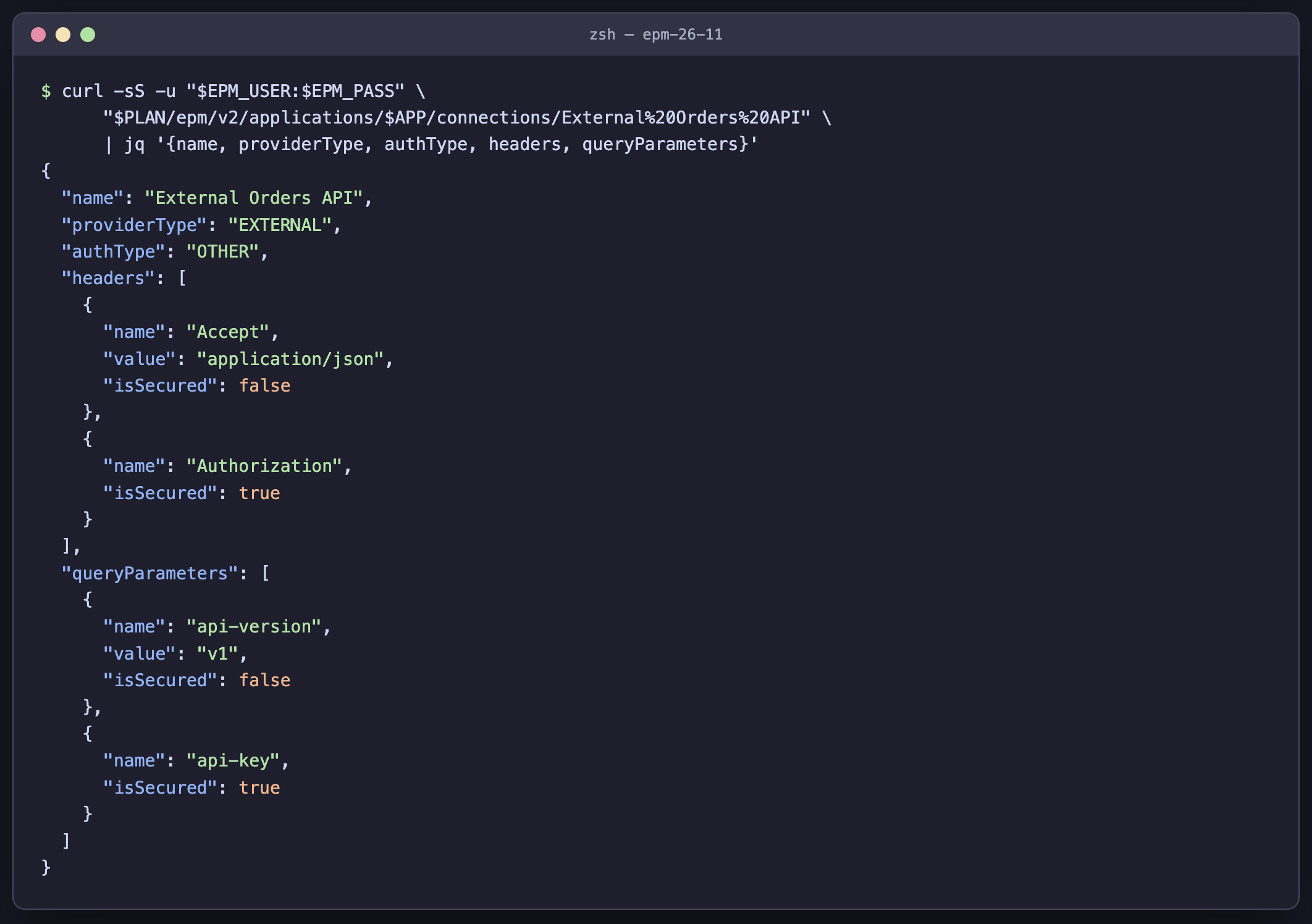
Oracle's sample for an external connection. The Authorization header and api-key parameter come back with isSecured true and no value.
Update is a PUT, but it's a partial update. Fields you leave out keep their stored values. The exception is headers and queryParameters, where an array you send replaces the whole collection. To keep a secured header while you change another one, send the secured header's name with isSecured: true and no value.
{
  "headers": [
    { "name": "Authorization", "isSecured": true },
    { "name": "Accept", "value": "application/xml", "isSecured": false }
  ]
}
The connection pages are the roughest of the set. The update page says switching an EPM connection from Basic to OAuth 2.0 is allowed, then says its own error table contradicts that.
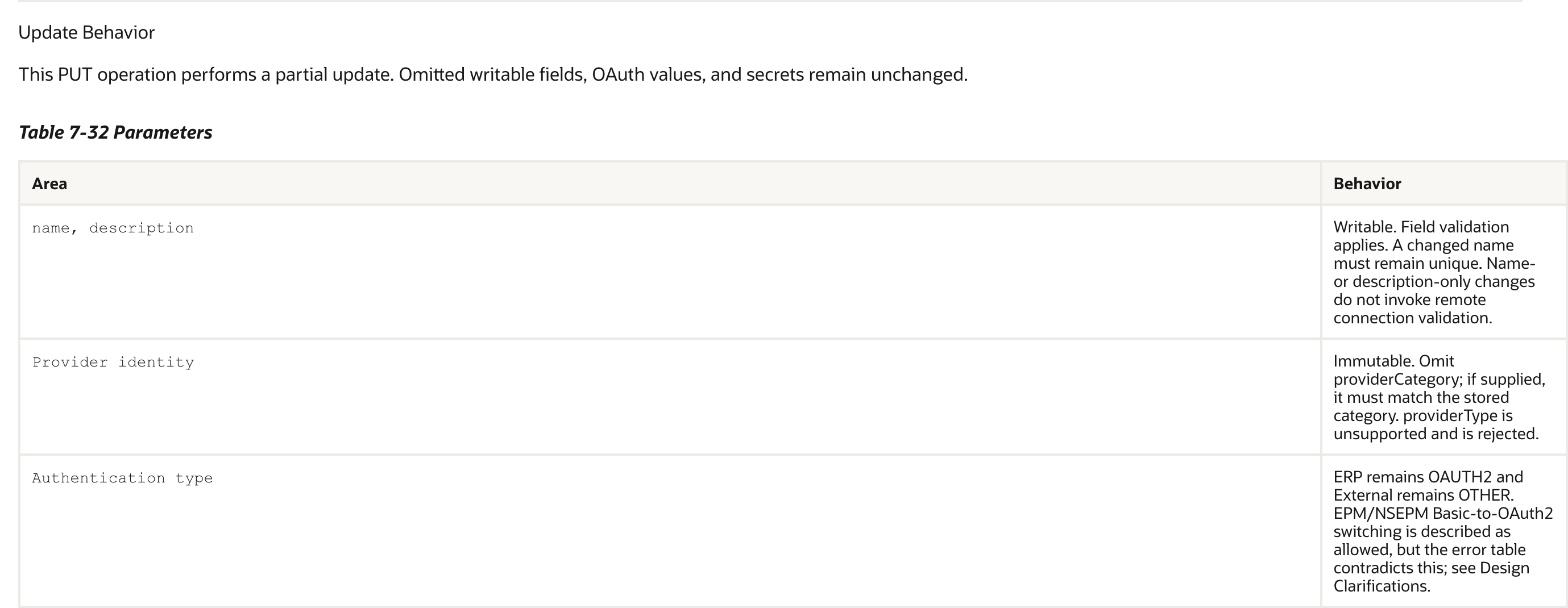
The Authentication type row points to "Design Clarifications," which isn't on the page.
The delete page still has editor notes in it. The media type reads "To be confirmed," and the page doesn't give a status code. The script prints whatever status code comes back.
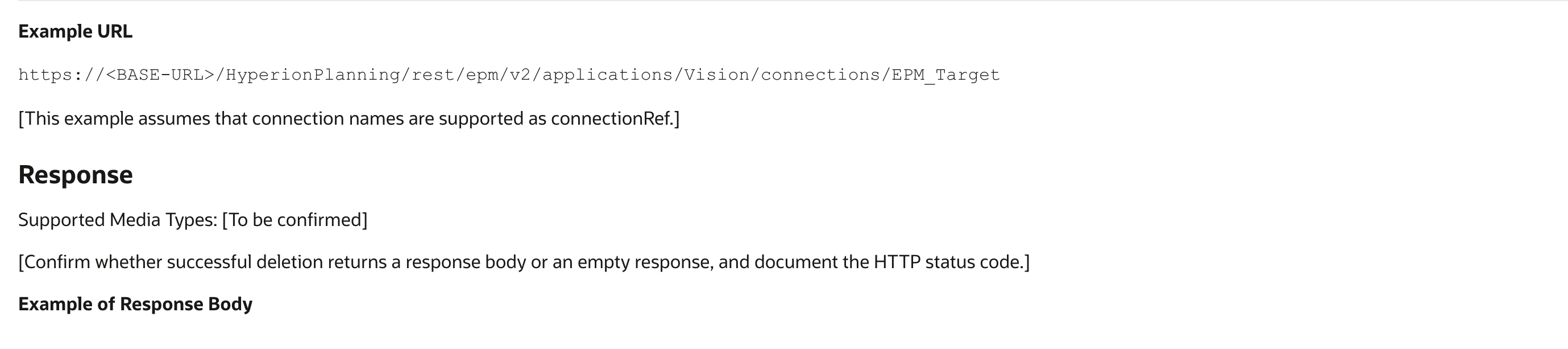
Delete a Connection on November 18, with the response still marked as an open question.
IPM calendars
Two calendar calls shipped with the insight pages. They need Service Administrator or IPM Manage.
POST /HyperionPlanning/rest/v3/applications/{application}/ipm/calendars
GET  /HyperionPlanning/rest/v3/applications/{application}/ipm/calendars/{calendarUuid}
There is no calendar list call. Find calendars through the objects API with q={"objectType":"IPM Calendar"}. Creating a calendar doesn't attach it to forms or generate insights. If a create times out, check the objects API before you retry it.
Still missing
These gaps are still open as of November 18:
- Get Dashboard Data has no page.
- Import Dashboard Data has no request body example.
- The worklist pages don't show
$filtersyntax. - Query Application Objects doesn't list Insights as an object type.
- Delete a Connection doesn't document its response.
I'll update this post as Oracle fills them in.
Comments
Plain text only. No account needed — blank name shows as Anonymous. You can reply once under any top-level comment.
Loading…