
Oracle EPM Agent Skills in Claude: install, auth, and the 200-file limit
Get Oracle's EPM AI Skills running in Claude: split the zip past the 200-file limit, allow oraclecloud.com, and set up Basic, SSO, or refresh-token auth.
Share on LinkedIn
Oracle now ships a set of agent skills for EPM Cloud. In the Downloads dialog it's called EPM AI Skills, the zip is EPM_AI_Skills.zip, and the folder inside is EPM_Agent_Skills. Oracle's own description says you can deploy them in AI agents "such as ChatGPT/Codex and Claude". The package itself is written for Codex and ChatGPT. The docs only name Codex and ChatGPT as runtimes, and never mention Claude.
I got it running in the Claude desktop app and in Claude Code. The desktop app takes more work, because Claude won't take Oracle's zip as is. You have to split it to get under a 200-file limit, let Claude reach oraclecloud.com, and upload two skills instead of one. Claude Code has none of those limits, so that section is short.
For auth, Basic is the quickest to try, and I ran it end to end against a real pod. Device-code SSO and refresh tokens need an OAuth client in your identity domain first. I didn't create one, so those identity-domain screens are mockups and the SSO receipt uses placeholder values. I call that out where they show up.
Download the package
The download is only on pods that are on 26.11. I tried a pod still on 26.09 first, and the option isn't there.
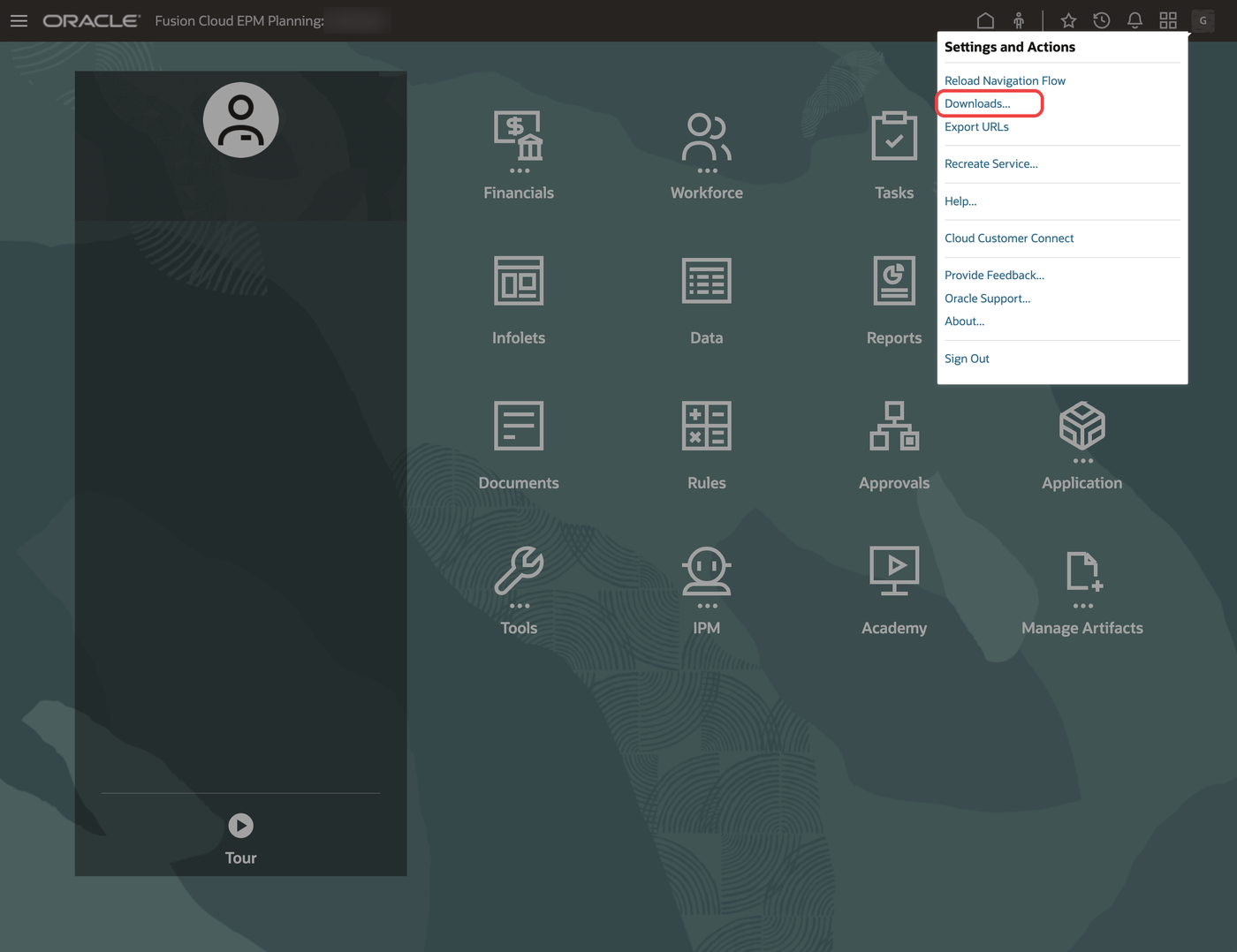
Click your avatar in the top right to open Settings and Actions, then click Downloads...
The dialog lists EPM Automate, EPM AI Skills, and Smart View. Click Download under EPM AI Skills.
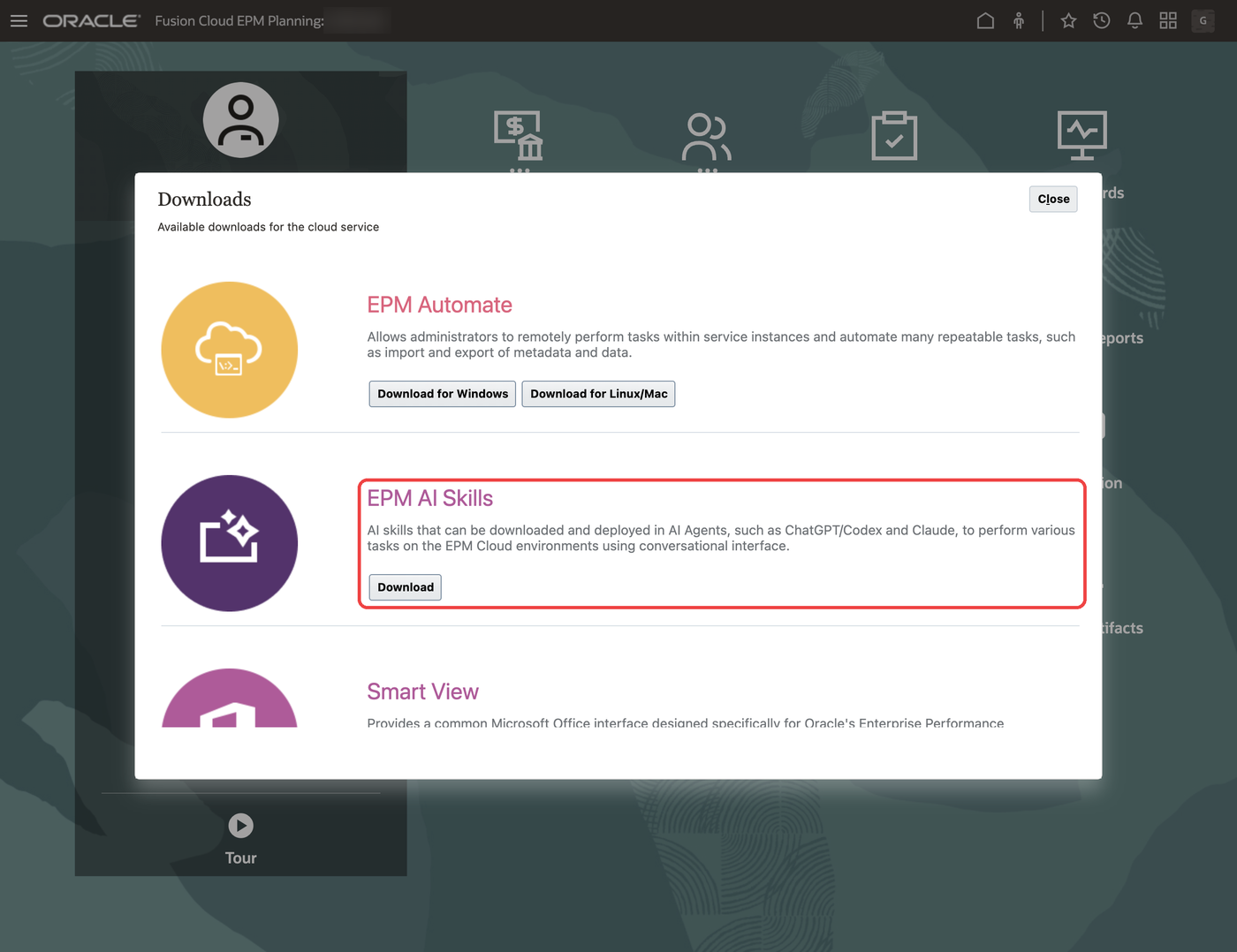
The description names Claude, even though the package inside only talks about Codex and ChatGPT.
You get EPM_AI_Skills.zip, about 800 KB. Inside is one folder, EPM_Agent_Skills, with a router SKILL.md at the top and four skills under it:
| Folder | Skill name | What it does |
|---|---|---|
Core/ | epm-core | Users, groups, security, access logs, snapshots, files, maintenance window, mail, Essbase exports |
Auth/ | epm-auth | Basic, device-code SSO, OAuth access tokens, refresh tokens |
Platform/ | epm-planning | Planning data exploration and Planning REST tasks |
StrategicModeling/ | epm-strategic-modeling | Strategic Modeling models, accounts, and scenarios |
The skills are mostly markdown plus Python and Node helper scripts. The scripts do the actual REST calls and keep passwords and tokens out of the chat.
Claude won't take the zip as is
In the Claude desktop app, skills go in under Plugins > Add > Upload plugin. Pick EPM_AI_Skills.zip and Claude reads the router fine. The preview shows epm-agent-skills and its description. Then it refuses the upload.
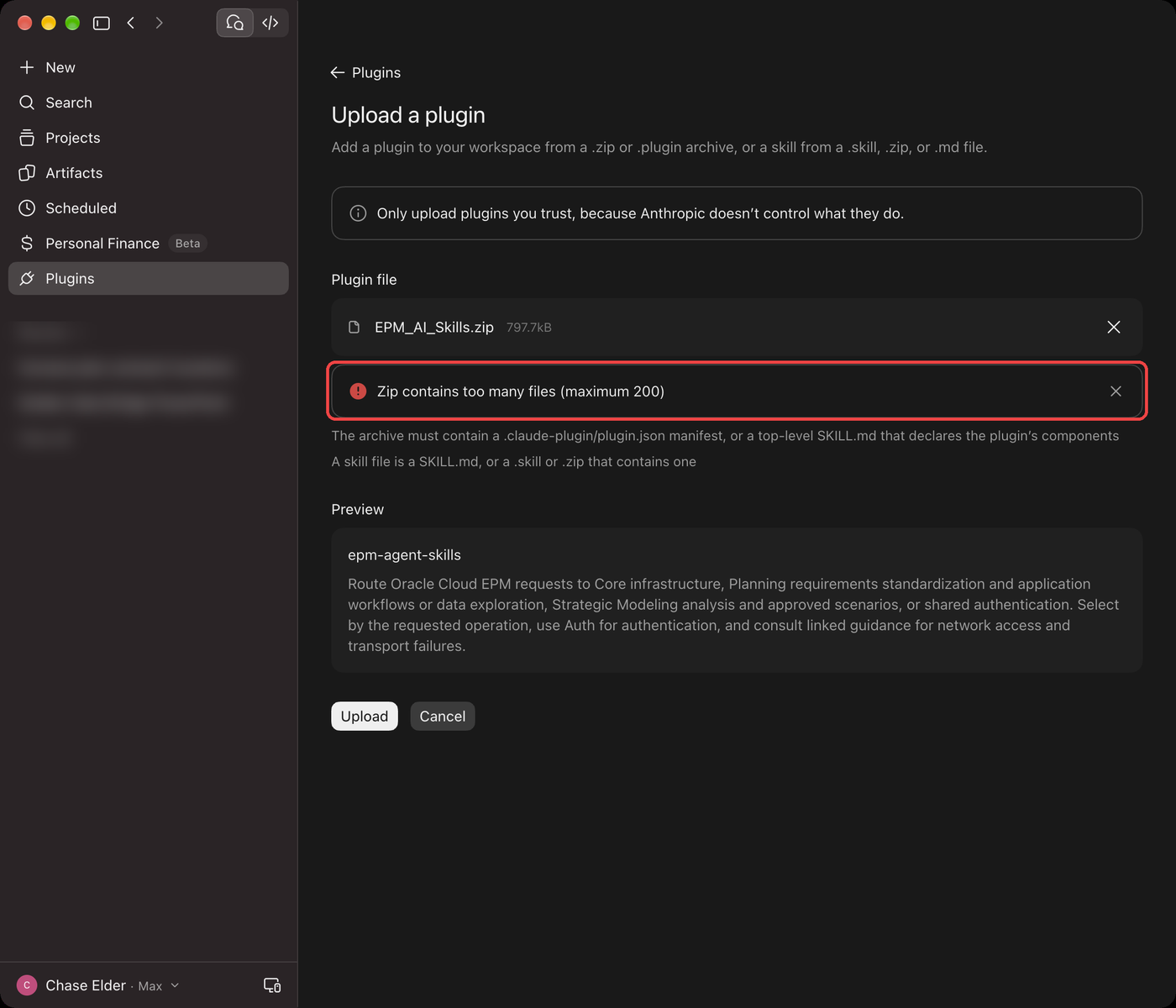
"Zip contains too many files (maximum 200)." Oracle's zip has 250.
You can't fix this by deleting files at random. The Auth skill links into Core/references/, and each skill's SKILL.md links to its own reference files. The fix is to split it into two skills by Oracle's own folders:
| Zip | Holds | Files |
|---|---|---|
epm-core.zip | Core and Auth | 124 |
epm-planning.zip | Platform (Planning), Strategic Modeling, Auth, and the four Core reference files Auth links to | 162 |
Auth goes in both, so either skill can sign in by itself. Oracle's files go in untouched. The only file that changes is the root SKILL.md in each zip. It gets its own name, a description of what that half covers, and a short note telling Claude where the other half lives.
I put that in a script. It's in the companion repo linked at the bottom of this post. It has no dependencies, so any Python 3 will do.
python3 split_for_claude.py ~/Downloads/EPM_AI_Skills.zip --out ~/Downloads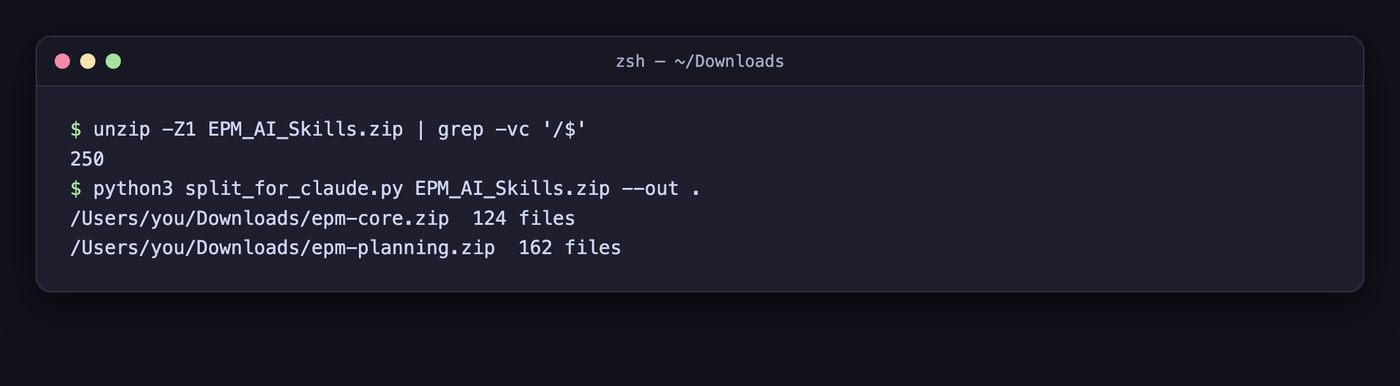
The script stops with an error if either zip would go over 200 files. It also stops if a description would go over 500 characters. My first version of the epm-core description was 508 characters, and Claude cut it off mid-word on the plugin page.
Turn on code execution and allow oraclecloud.com
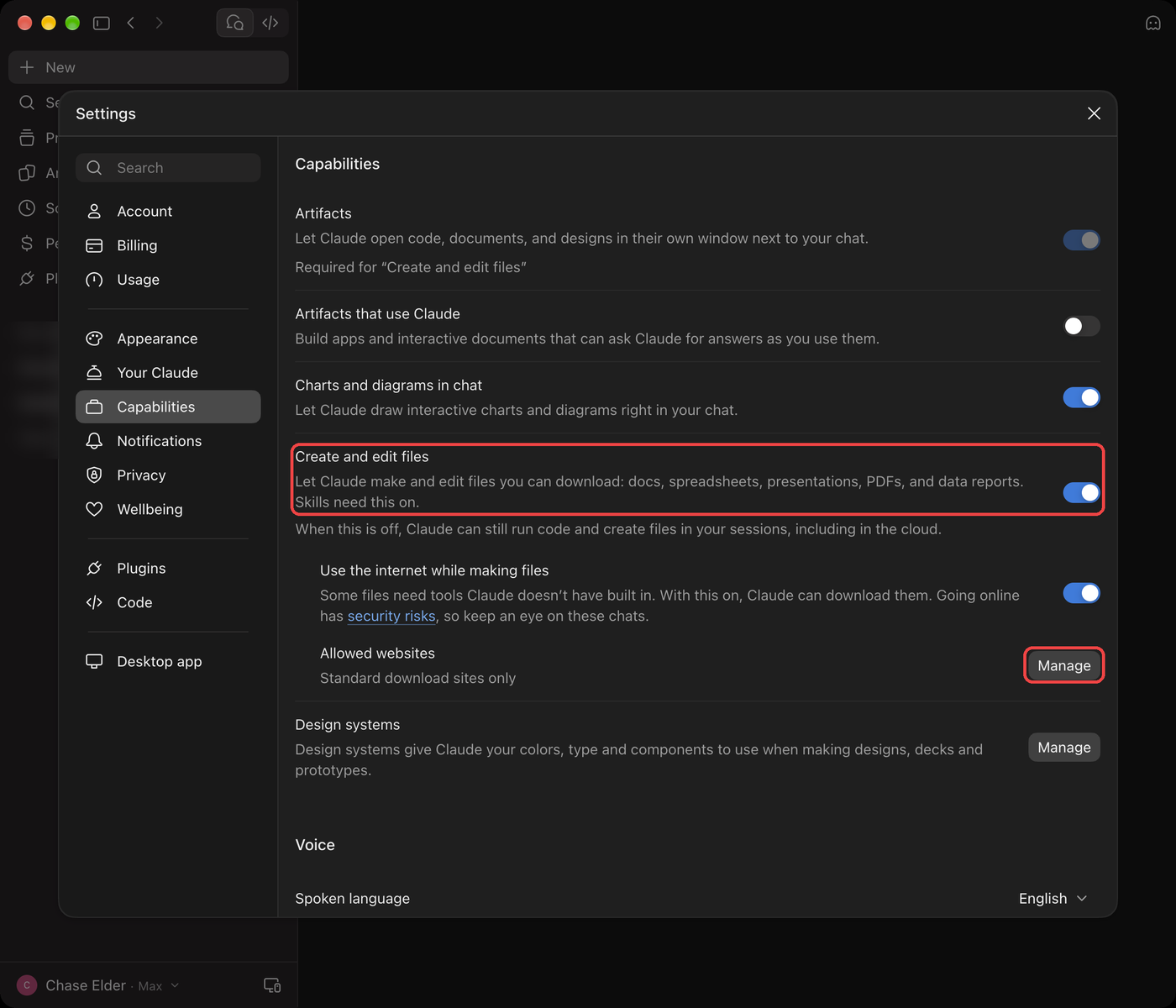
The skills run Python, so Claude needs code execution. By default it also can't reach your pod. Open Settings > Capabilities:
- Create and edit files has to be on. Claude's own text under it says "Skills need this on."
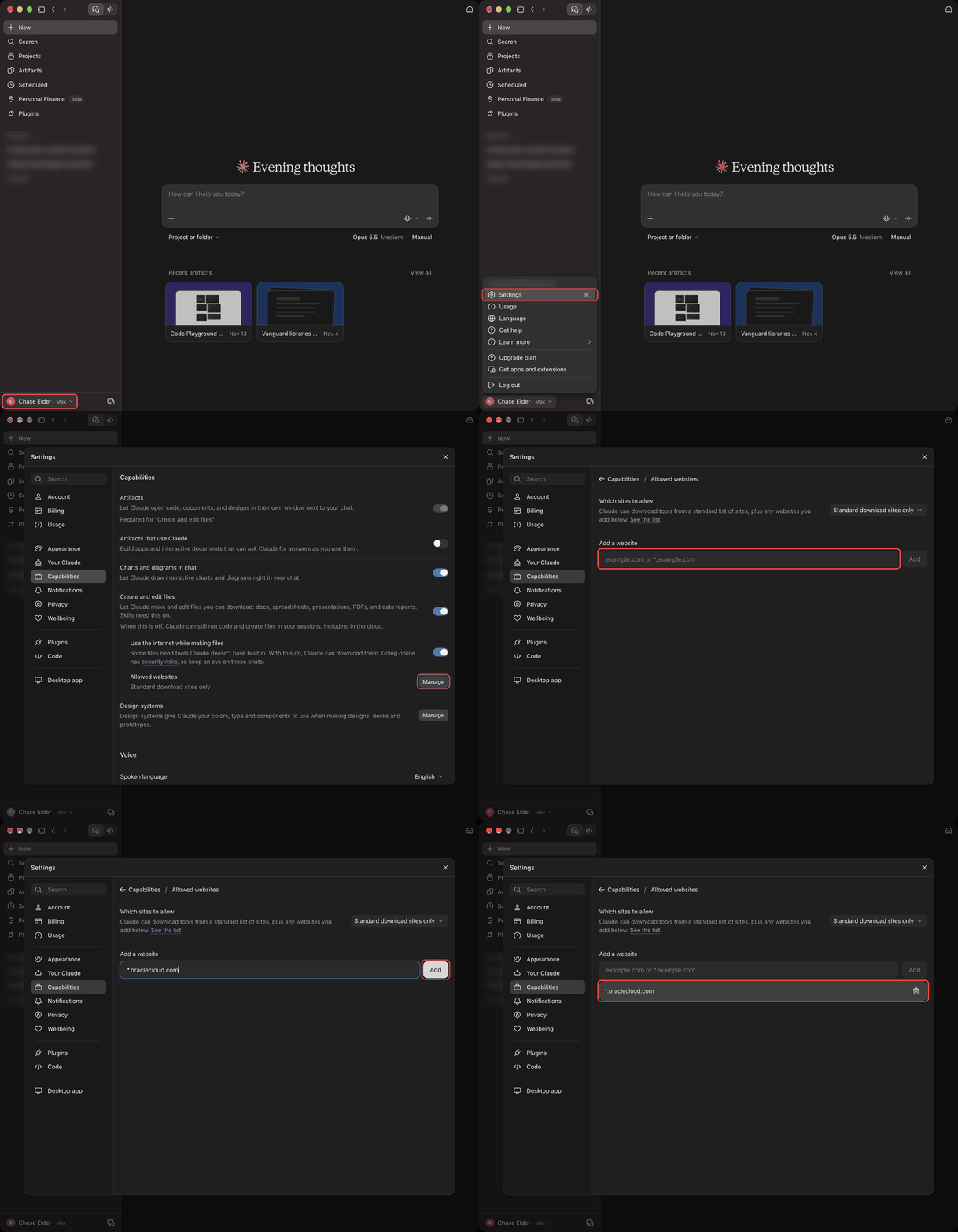
- Under Allowed websites, click Manage, type
*.oraclecloud.com, and click Add.
Here's the whole click path:
The wildcard covers your pod (*.epm.<region>.ocs.oraclecloud.com) and the identity domain (idcs-*.identity.oraclecloud.com) that SSO and refresh tokens talk to. If your pod is on a custom domain or behind a VPN, the allowlist won't help. Claude's code runs in Anthropic's cloud, not on your Mac, so it doesn't have your VPN route.
Upload the two skills
Go to Plugins, click Add, then Upload plugin. Drop in epm-core.zip, check the preview, and click Upload. Then do the same with epm-planning.zip.
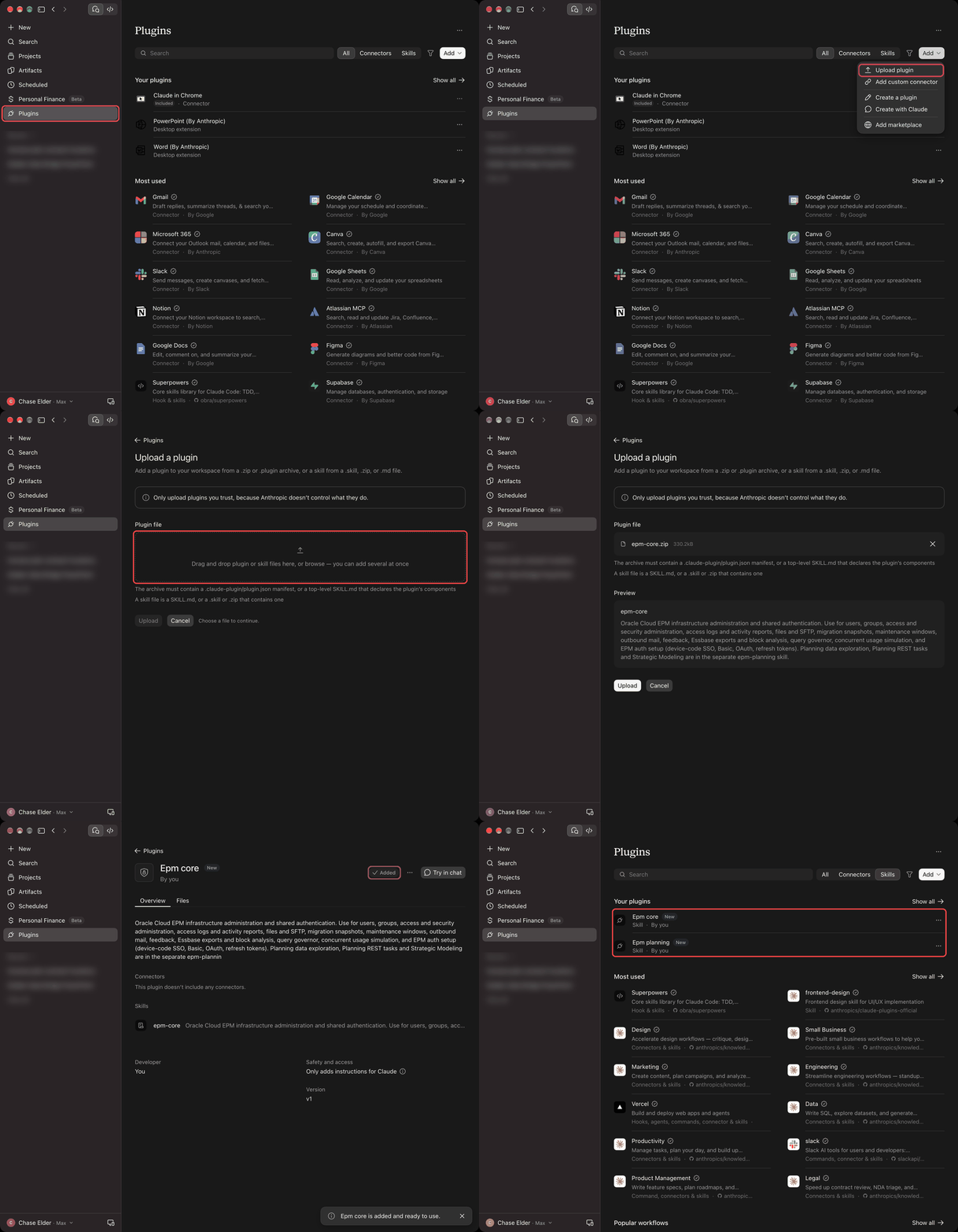
When both are in, the Skills tab lists Epm core and Epm planning.
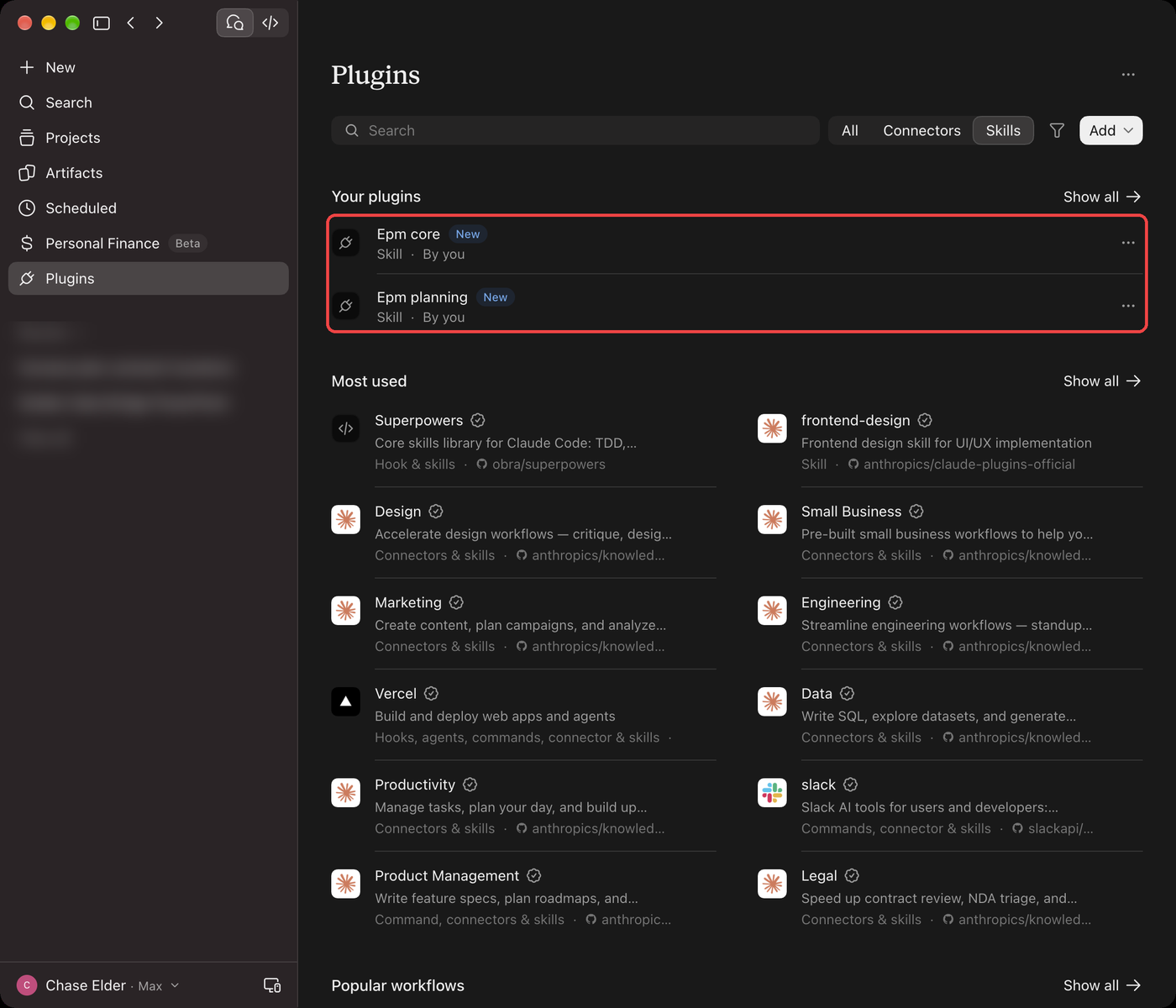
You don't need to tell Claude which skill to use. Ask for a maintenance window or a user list and it loads epm-core. Ask about Planning forms or members and it loads epm-planning.
Pick an auth method
Every method produces the same thing. The Auth skill creates a private session folder and hands the other skills a path to it, and that path is all they ever see. The password or token stays in a file inside the session. Claude never prints it, and you should never paste it into the chat.
| Method | What you give Claude | What you need first |
|---|---|---|
| Basic | A four-line config file | A user that's allowed to use Basic auth for REST. No MFA on Basic. |
| Device-code SSO | The EPM URL, client_id, and serviceInstanceID | A public OAuth client in your identity domain |
| Refresh token | A file with the refresh token, plus the client_id | The same OAuth client, and a first refresh token |
| Access token | A file with the access token | A token you got some other way. It expires in about an hour. |
Bootstrap builds the session and never calls Oracle. Every receipt says "oracle_authentication": "not_checked" and "request_sent": false. Your first real request is the first time Oracle sees the credential, so that's where a bad password shows up.
Basic auth
Basic is the quickest way to try this. Make a text file with these four lines:
EPM Environment URL: https://<service>-<tenant>.epm.<region>.ocs.oraclecloud.com
EPM Environment Name: EPM Test
Username: <[email protected]>
Password: <password>
Keep the labels exactly as shown, with each field on its own line. On my first try the file had all four fields on one line. Claude worked around it, but the helper expects one field per line, so do it that way. The name is a label you pick. You'll use it in the prompt.
For more than one pod, repeat the block in the same file:
EPM Environment URL: https://<service>-test-<tenant>.epm.<region>.ocs.oraclecloud.com
EPM Environment Name: EPM Test
Username: <[email protected]>
Password: <password>

EPM Environment URL: https://<service>-<tenant>.epm.<region>.ocs.oraclecloud.com
EPM Environment Name: EPM Prod
Username: <[email protected]>
Password: <password>
With more than one block, the helper won't pick an environment for you. Name it in the prompt or Claude will ask.
In a new chat, click +, then Upload or add files, then Upload from computer, and pick the file. The attachment should say "4 lines". Then ask for something read-only:
Use Basic Auth with my attached configuration file for EPM Test. Then get the maintenance start time and time zone.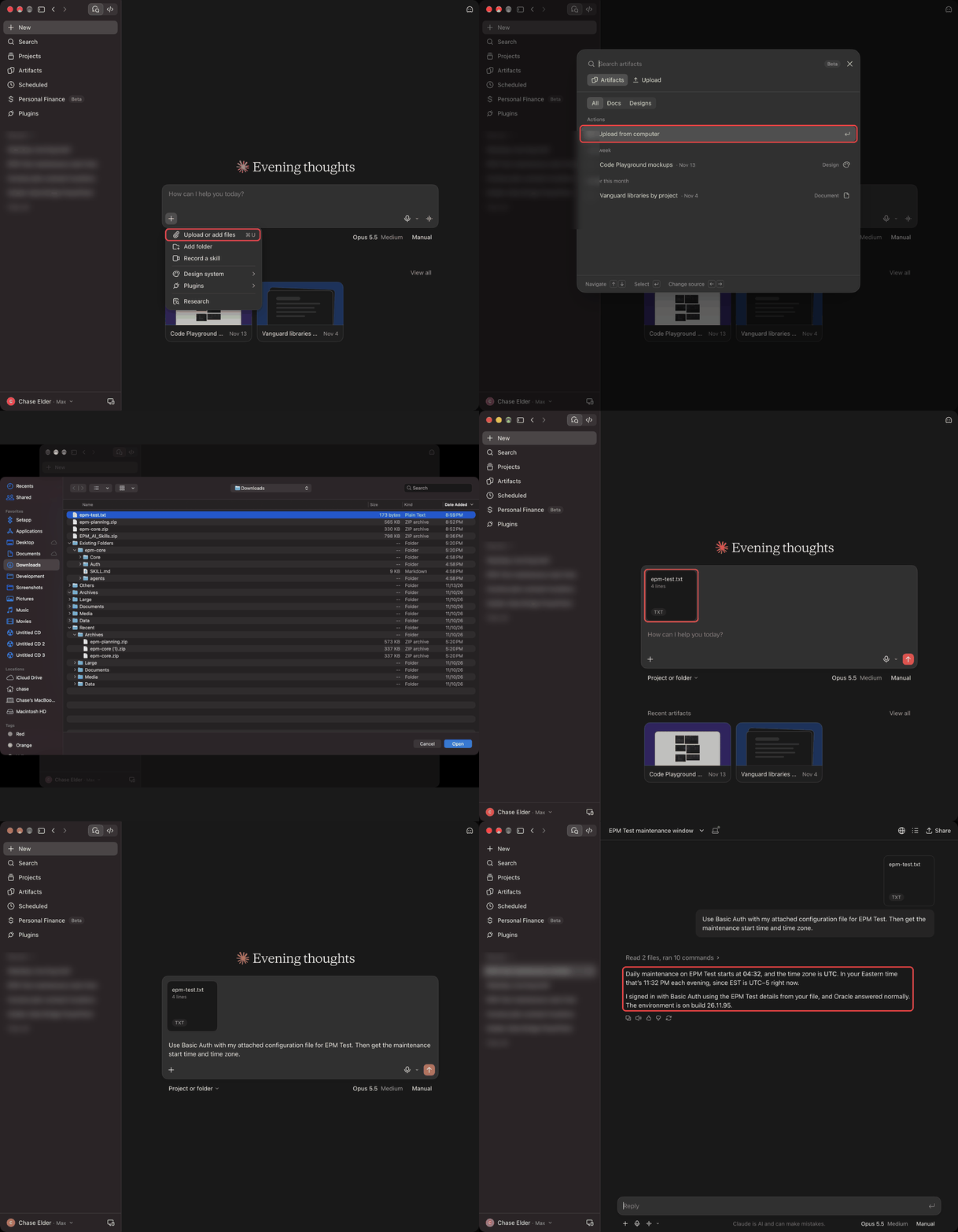
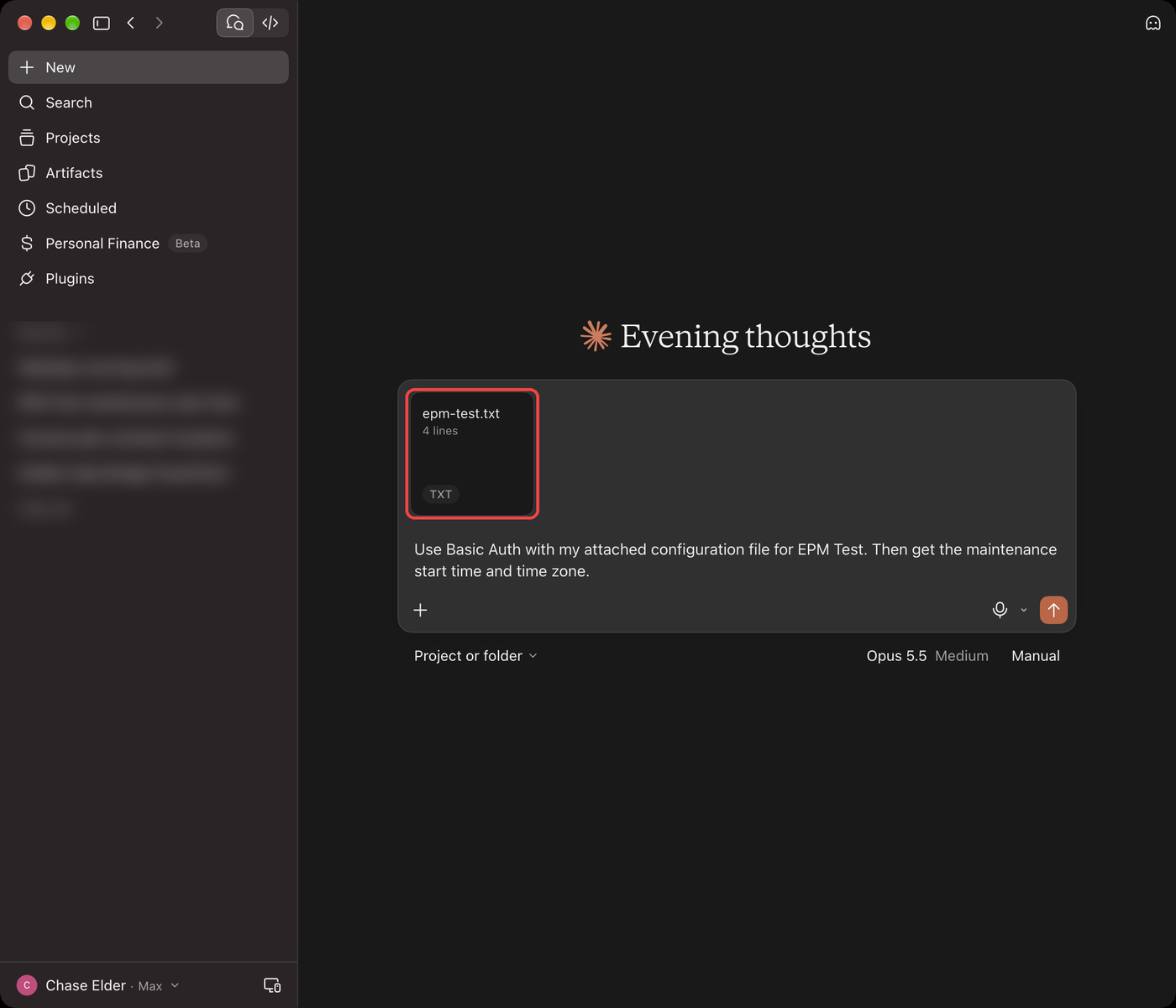
Open the "Read 2 files, ran 10 commands" line to watch it work. Claude loaded epm-core, read the Core and Auth SKILL.md files, bootstrapped a Basic session for EPM Test, and then called the maintenance window API.
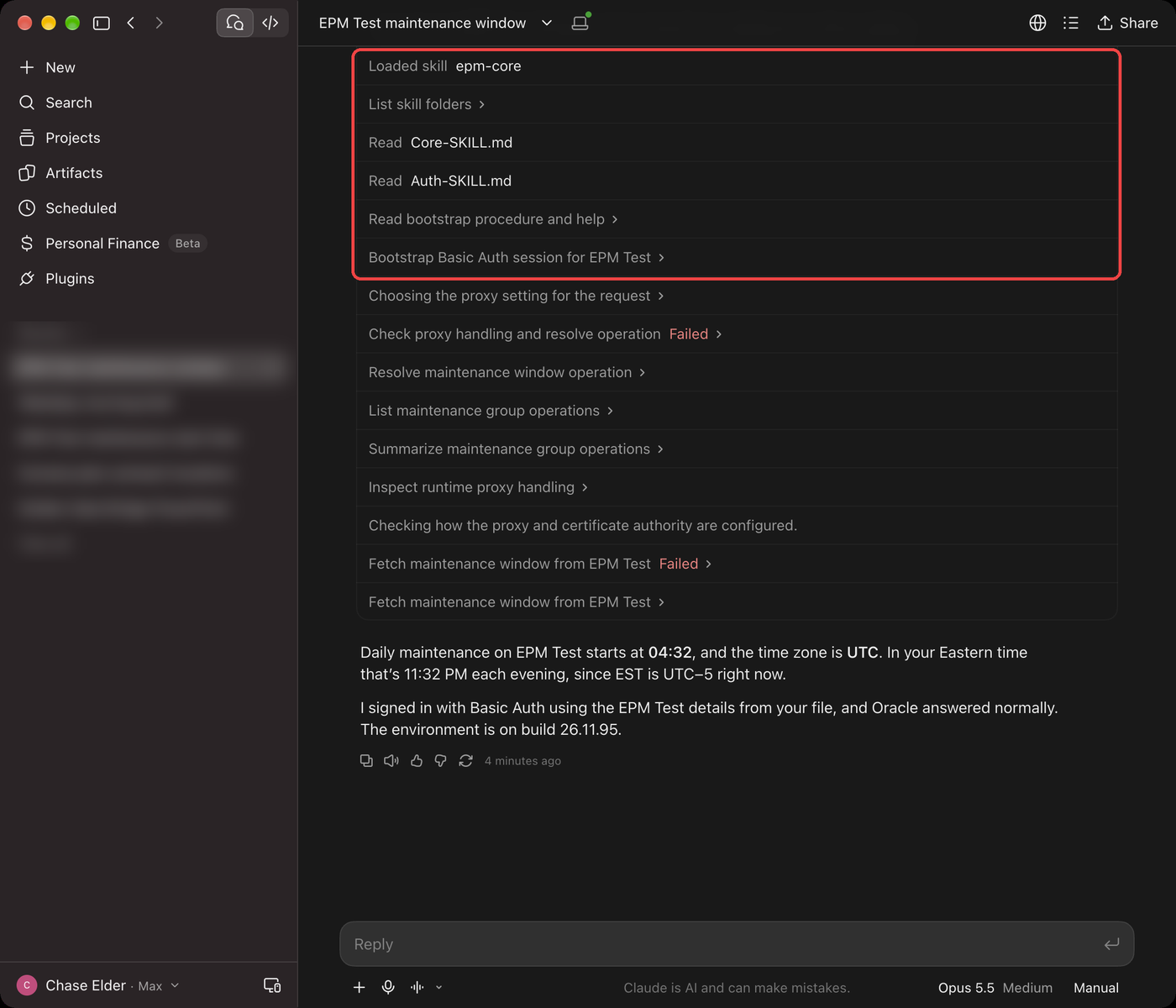
Two of the steps say Failed, and that's fine. The skills were written for Codex, so Claude had to work out that its sandbox needs Oracle's runtime proxy flag. The second failure was the helper rejecting a call without --group. Claude fixed both and moved on without asking me anything. The helper rejected the missing --group locally, so that call never reached the pod.
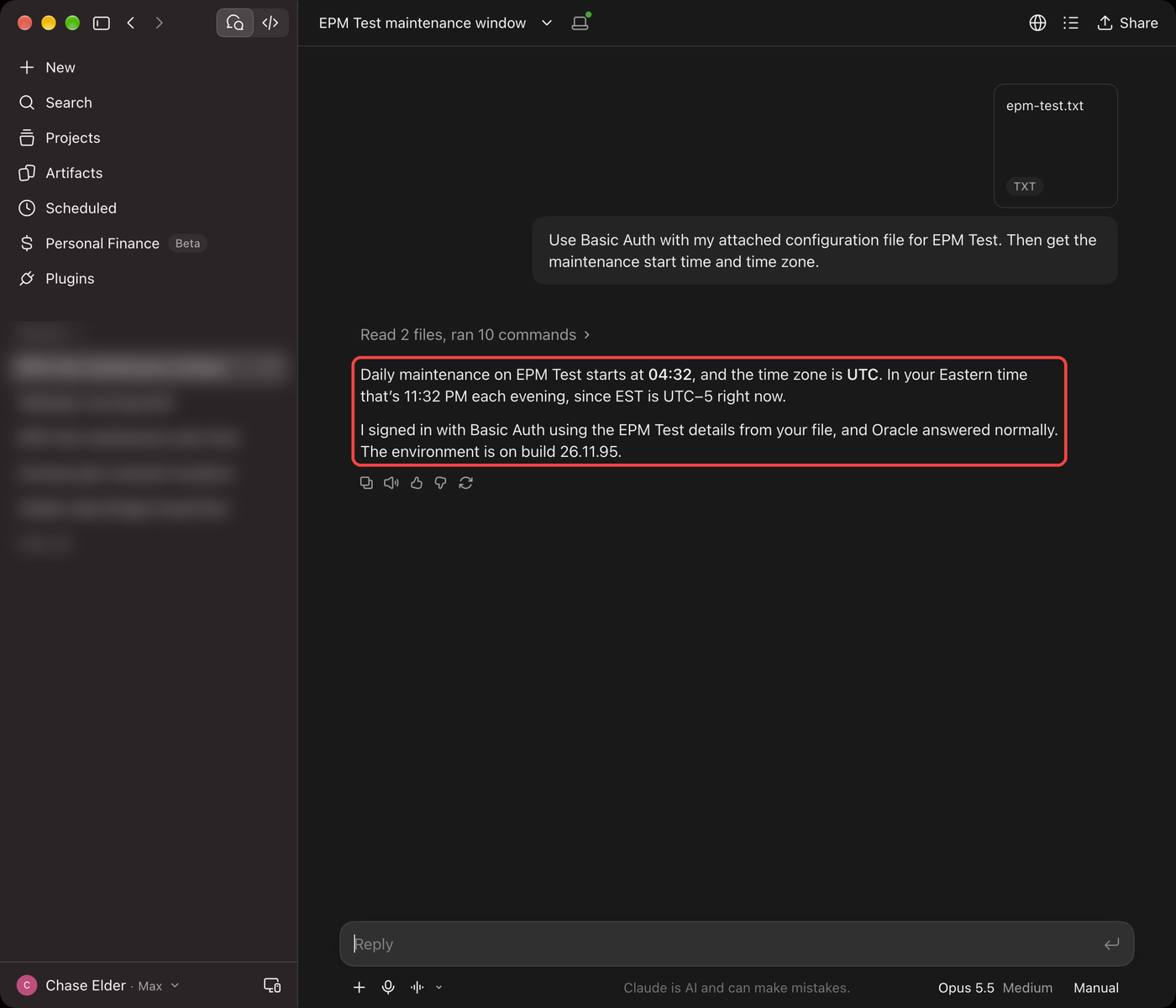
04:32 UTC, which it also converted to my time zone, and the build number came back as 26.11.95.
Device-code SSO
SSO is the one most clients will want, because nobody hands over a password. You sign in on Oracle's page like you normally would, MFA included, and the helper polls until Oracle issues a token.
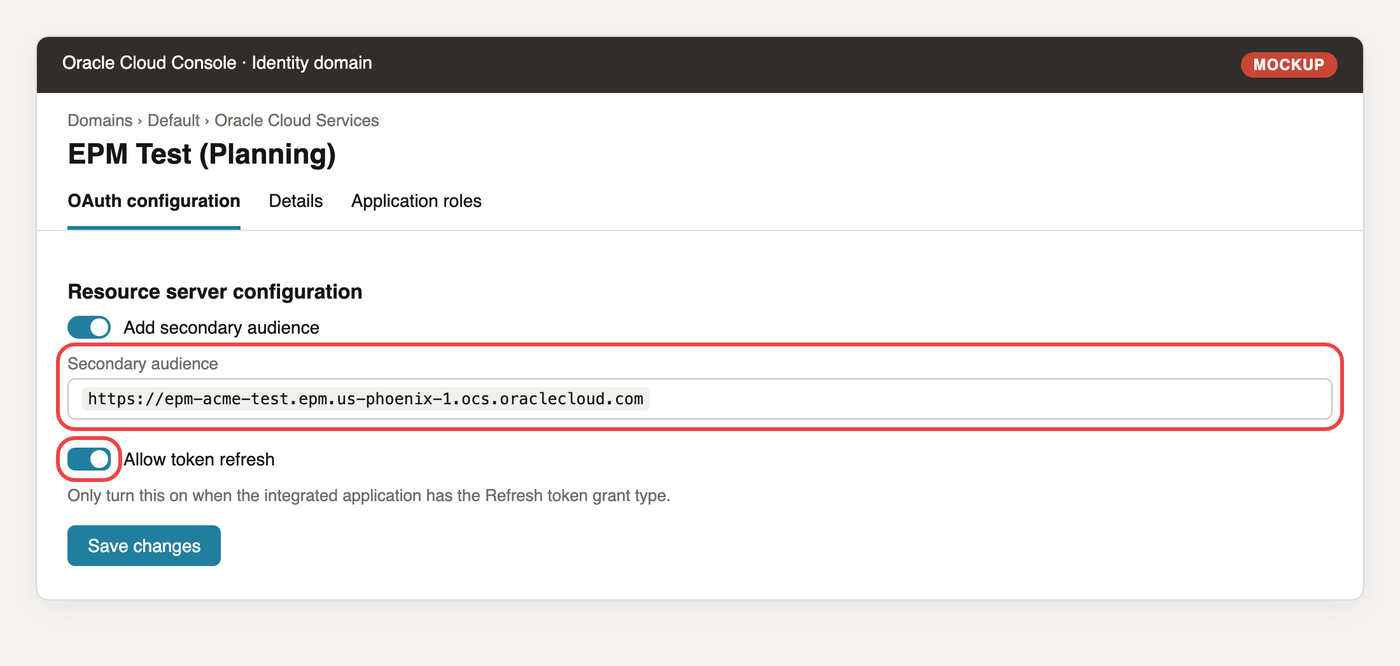
It needs an OAuth client in the identity domain first. Your identity domain admin does this once, and these are the steps from Oracle's OAuth 2 setup page. I didn't create a client for this post, so the screens below are mockups. The labels and values come from Oracle's steps.
1. Register a public client
In the Oracle Cloud Console, go to Identity & Security > Domains, pick the domain your EPM pods are in, open Integrated applications, and click Add application. Choose Mobile Application. That's Oracle's public client type, with no client secret.
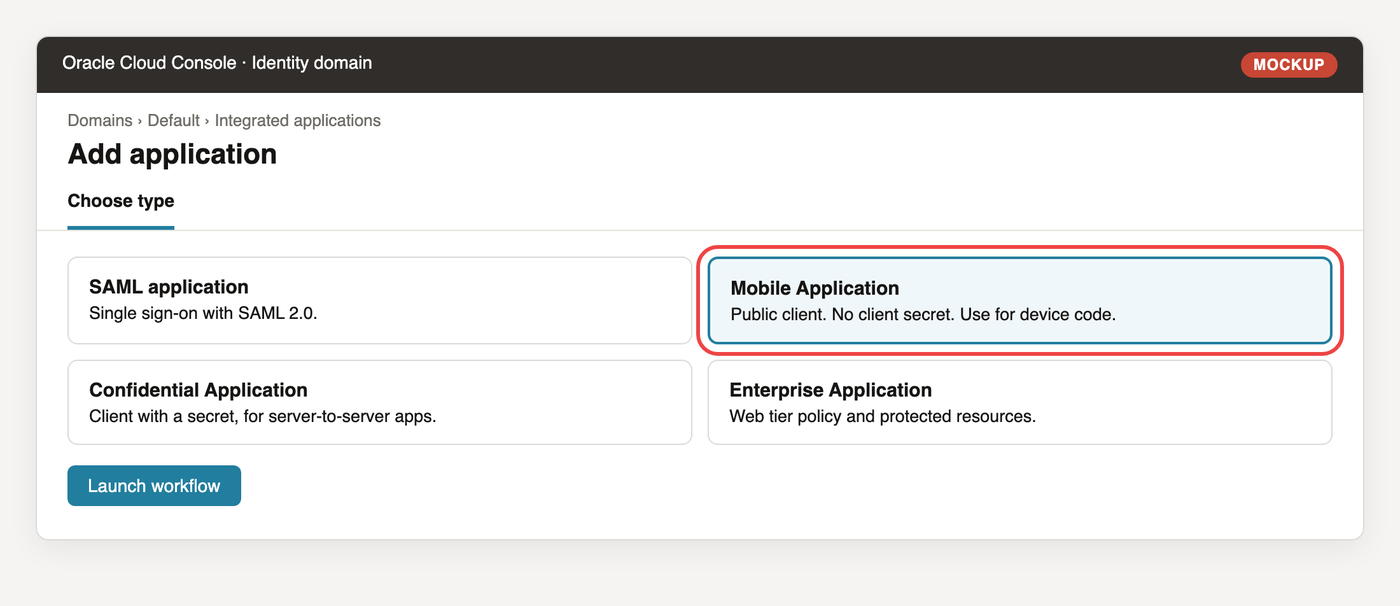
Give it a name and submit. Then open the OAuth configuration tab and click Edit OAuth configuration:
- Under Allowed grant types, check Refresh token and Device code. Leave Implicit off.
- Under Token issuance policy, turn on Add resources, click Add scope, and pick each EPM pod this client should reach. Write down the scope next to each one.
- Turn on Add app roles and add Identity Domain Administrator. Oracle's steps include it.
- Submit, then Actions > Activate. Copy the Client ID.
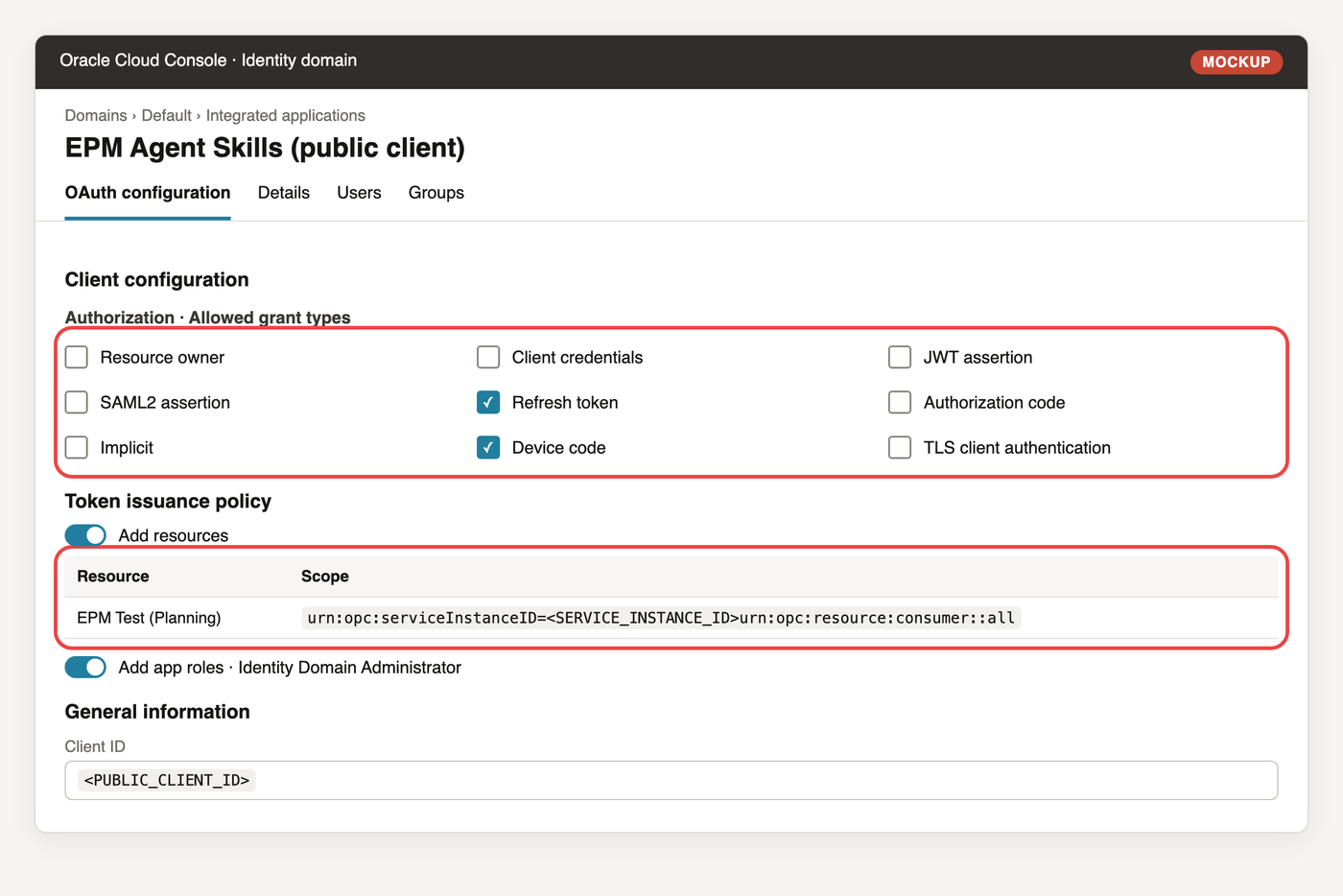
The scope for each pod looks like this:
urn:opc:serviceInstanceID=<SERVICE_INSTANCE_ID>urn:opc:resource:consumer::all2. Turn on token refresh for each pod
Still in the domain, open Oracle Cloud Services and click the EPM service. On its OAuth configuration tab, turn on Add secondary audience and enter the pod's base URL, which is the URL without /epmcloud. Then turn on Allow token refresh and save. Do this for every pod you added in step 1.
3. Ask Claude
Give Claude the three values. The Auth skill picks SSO by itself when it sees a client_id with a serviceInstanceID, so you don't need to say "SSO", but it doesn't hurt.
Set up SSO for EPM Test.
EPM URL: https://<service>-<tenant>.epm.<region>.ocs.oraclecloud.com
client_id: <public client ID from the identity domain>
serviceInstanceID: <EPM service instance ID>
The helper builds the scope from your serviceInstanceID and adds offline_access, so Oracle also issues a refresh token. Claude replies with an Oracle link and a short code. Open the link, type the code, and sign in. Claude polls in the background and confirms when the token is saved. The helper runs two commands:
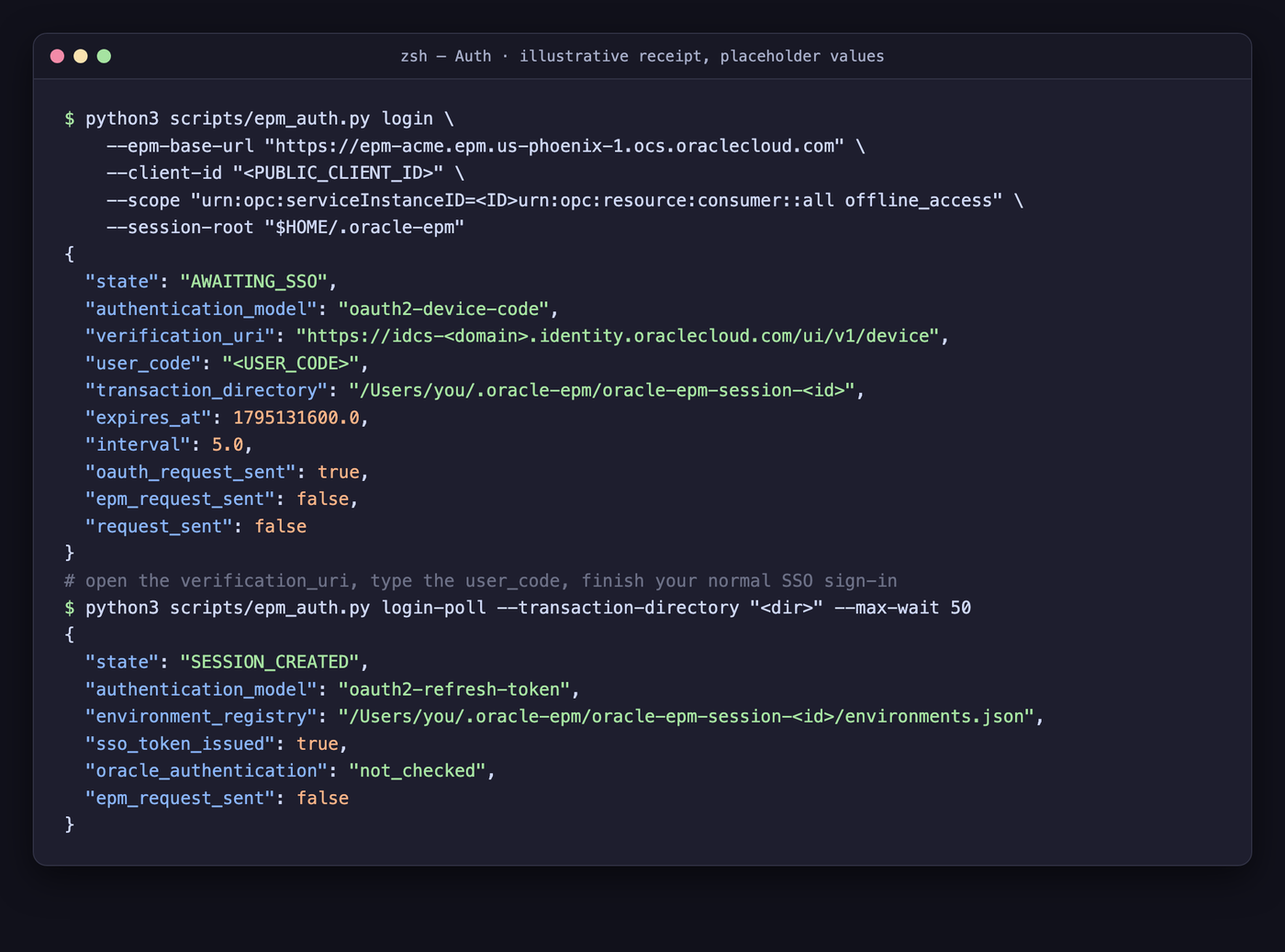
Placeholder values. The real receipt has your identity domain URL and a real user code. The device code never shows up in it.
With that said, in the Claude desktop app the session lives in that chat's sandbox. When the sandbox goes away, so does the saved token, and you sign in again. That's fine for a few questions. For anything regular, run it in Claude Code, where the session folder lives on your Mac.
Refresh-token file
This is for when you already have a refresh token, either from Oracle's device-code curl steps or from an SSO session in Claude Code. Put the token alone in a file. Don't add a Bearer prefix or JSON around it. Then attach the file and give Claude the URL and client ID:
Use OAuth refresh-token authentication with my attached token file for EPM Test.
EPM URL: https://<service>-<tenant>.epm.<region>.ocs.oraclecloud.com
client_id: <public client ID from the identity domain>
The helper finds your identity domain from the pod's /epmcloud redirect, so you don't need the IDCS URL. Before each request it swaps the refresh token for an access token, and it saves the new refresh token Oracle sends back before it uses the access token.
That swap causes a problem in the desktop app. Oracle rotates the refresh token, so after the first request the file you uploaded is used up. The new token only lives in the chat's sandbox. Upload a refresh token to Claude only if you're fine getting a new one next time. For anything you'll keep using, keep the file on your Mac and use Claude Code.
Claude Code
Claude Code reads skills from ~/.claude/skills/, and there's no file limit there. Skip the split script and copy Oracle's folder in as is:
cd ~/Downloads
unzip -q EPM_AI_Skills.zip
mkdir -p ~/.claude/skills
cp -R EPM_Agent_Skills ~/.claude/skills/epm-agent-skills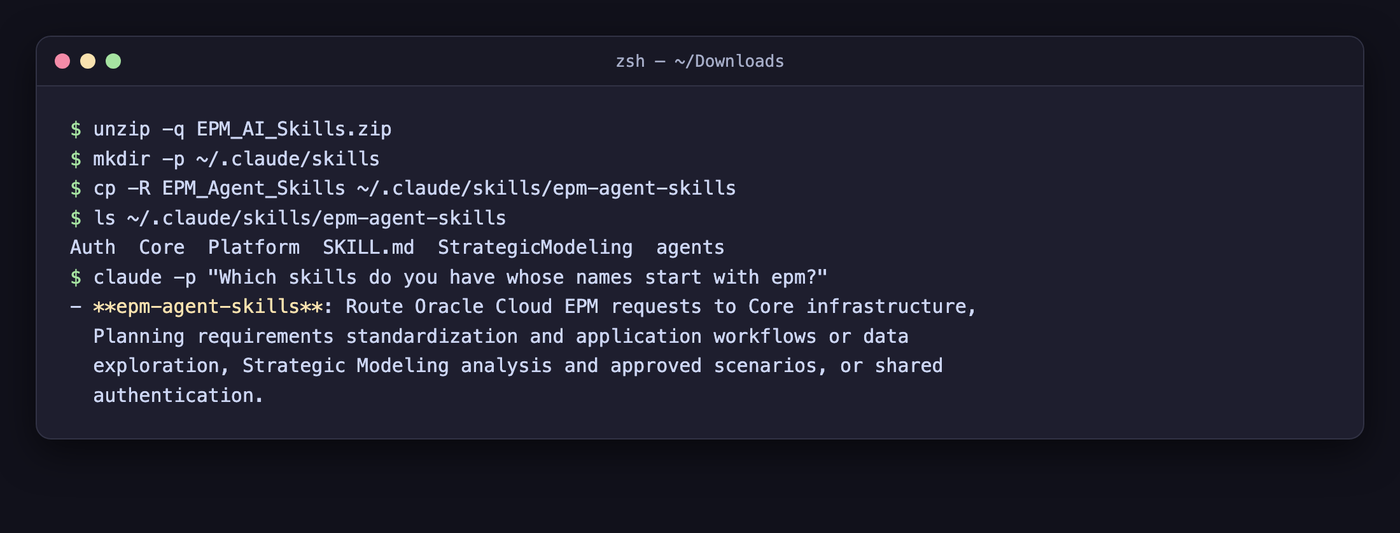
I trimmed the list to the Oracle skill. The router's name is epm-agent-skills, so that's what Claude Code shows.
The helpers need Python 3.10 or later. Run python3 --version first. The Planning and Strategic Modeling skills also use Node.
Everything here runs on your Mac, with your network and your VPN. You can point the helper at local files instead of uploading anything. For Basic, keep the config file somewhere private and lock it down:
mkdir -p ~/.oracle-epm && chmod 700 ~/.oracle-epm
chmod 600 ~/.oracle-epm/epm-test.txt
Then tell Claude Code where it is: "Use Basic auth with the config file at ~/.oracle-epm/epm-test.txt for EPM Test, and keep sessions in ~/.oracle-epm." This is what the helper does with it. I ran it against a dummy file, so these are real receipts with fake credentials:
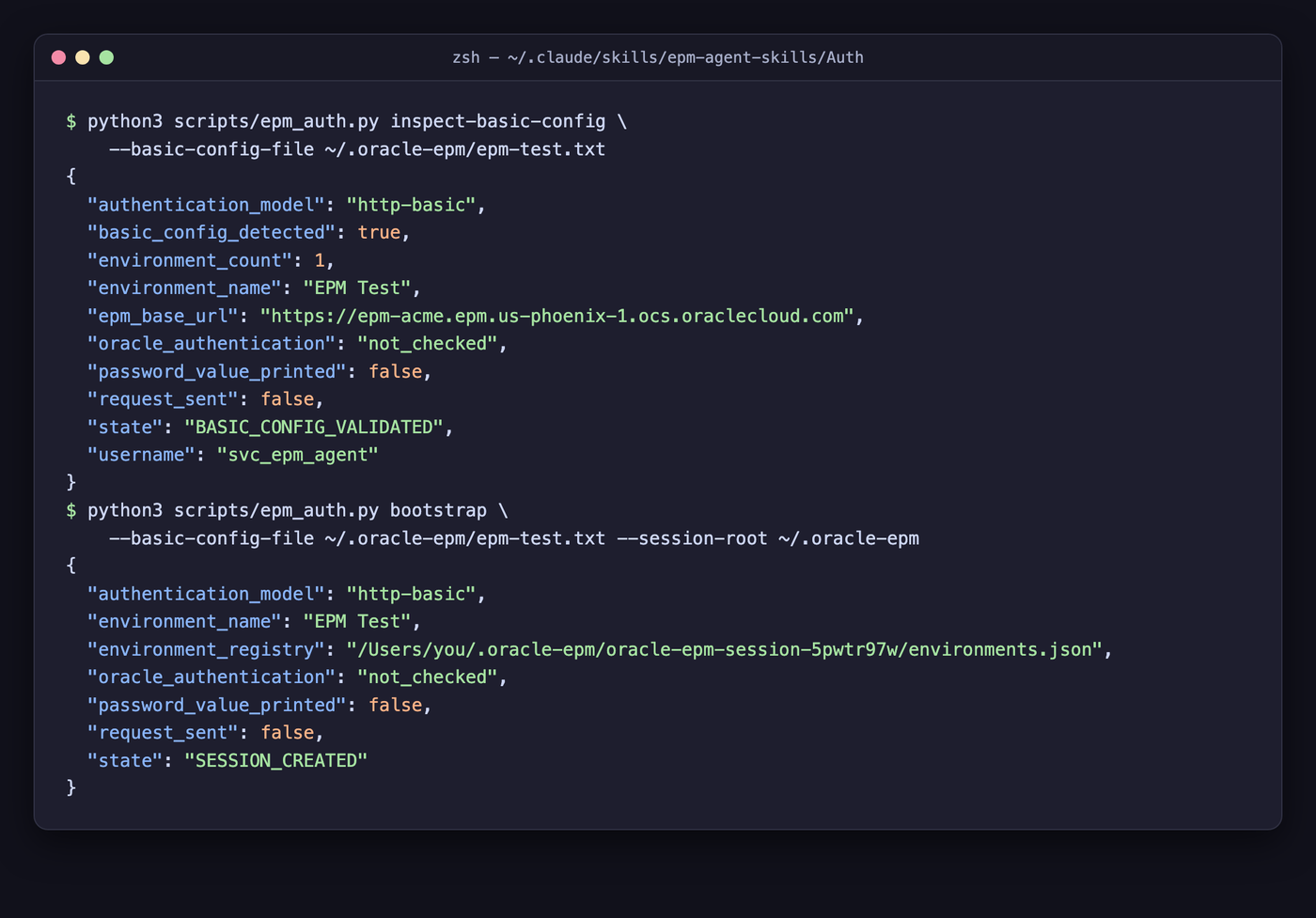
inspect-basic-config reads the file privately and returns only the URL, name, and username. bootstrap builds the session. Neither one prints the password or sends anything to Oracle.
A refresh token works the same way. The token file has to be private (600), and so does its folder (700), because the helper rewrites the token in place every time Oracle rotates it:
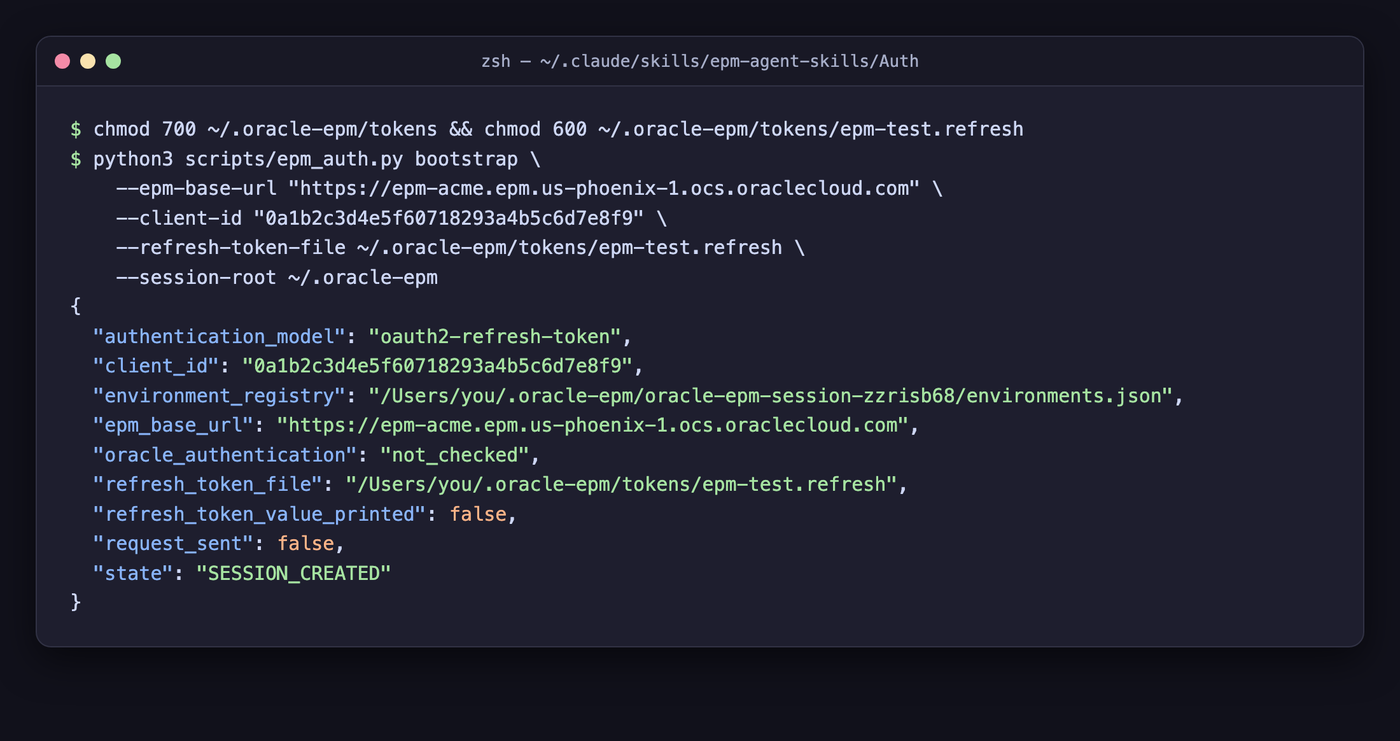
Because the session folder is on your disk, the rotated token is still there tomorrow. That's the main reason to use Claude Code for real work.
Things to know before you point it at a client pod
- Start on a test pod with read-only asks. The maintenance window, a user list, and an access log are good first questions.
- The skills ask for approval before anything that changes the pod. Read what it's about to do before you say yes. Oracle still enforces the roles of the user you signed in as.
- Basic auth for REST doesn't work for users that require MFA on Basic access. Use SSO for those.
- In the desktop app, every credential you attach goes to Anthropic's cloud sandbox. Use an account you can rotate.
- A refresh token uploaded to the desktop app is good for one chat. Keep long-lived tokens on your Mac with Claude Code.
- If Claude says it can't reach the pod, check the allowlist first. If it lists
*.oraclecloud.com, your pod probably needs a VPN, and only Claude Code on a connected Mac can reach it.
The split script, a Basic config template for one pod and for several, and the SSO and refresh-token prompts are in the companion repo.
Part 2 has more examples: snapshots, the Activity Report, and Planning substitution variables, plus how writes stop for approval.
Comments
Plain text only. No account needed — blank name shows as Anonymous. You can reply once under any top-level comment.
Loading…