


Databricks JDBC for Essbase 21c: mitmproxy capture and jdk-8 build
How we caught the Databricks JDBC driver sending scope=all-apis with mitmproxy, then built the jdk-8 branch on Java 8 for Essbase 21c.
Share on LinkedIn
Where we left off
In Part 1 the Databricks JDBC driver kept failing with oauth-m2m auth: Failed to refresh credentials: access_denied, and we said we found the cause by putting a proxy in front of the driver. This part shows how we did that. After that, it walks through building Databricks' own jdk-8 branch, which now has the scope fix, so you can run it on Essbase 21c without our patch.
The workspace host, client ID and secret in the screenshots are placeholders.
Watching the token request
The error showed that Databricks rejected the request. It didn't show what the driver had asked for. The quickest way to see the request was to route the driver through a local proxy that decrypts HTTPS.
Start mitmproxy
Install mitmproxy and start the web UI on port 8888:
brew install mitmproxy
mitmweb --listen-port 8888
The first run creates a certificate authority in ~/.mitmproxy. The proxy uses it to sign its own certificate for every host the driver talks to. Java won't trust that CA, so put it in a throwaway truststore that only your test uses:
keytool -importcert -noprompt -alias mitmproxy \
  -file ~/.mitmproxy/mitmproxy-ca-cert.pem \
  -keystore mitm-truststore.jks -storepass changeit
Don't import it into the system cacerts or into Essbase's Java. Anyone with the matching private key in ~/.mitmproxy can read traffic from any JVM that trusts it.
Point the driver at the proxy
The driver has its own proxy and truststore properties, so you add them to the JDBC URL. We did this in DBeaver first, by adding them to the end of the URL. For this post we used the small TestConnect class from the companion repo so every run is the same:
export DBX_HOST="<workspace-host>"
export DBX_WAREHOUSE_ID="<warehouse-id>"
export DBX_CLIENT_ID="<client-id>"
export DBX_SECRET="<client-secret>"
export DBX_SCOPE="sql"
export DBX_URL_EXTRA="UseProxy=1;ProxyHost=127.0.0.1;ProxyPort=8888;SSLTrustStore=mitm-truststore.jks;SSLTrustStorePwd=changeit;CheckCertRevocation=0;EnableTelemetry=0"

javac TestConnect.java
java -cp databricks-jdbc-3.2.1.jar:. TestConnect
TestConnect builds the URL with Auth_Scope=sql, appends DBX_URL_EXTRA, and passes the secret as a connection property so it never shows up in the URL or the output.
There are two snags before you see anything useful.
The first is Java. Databricks compiles the published driver for Java 11, so on Java 8 it doesn't get as far as opening a socket:
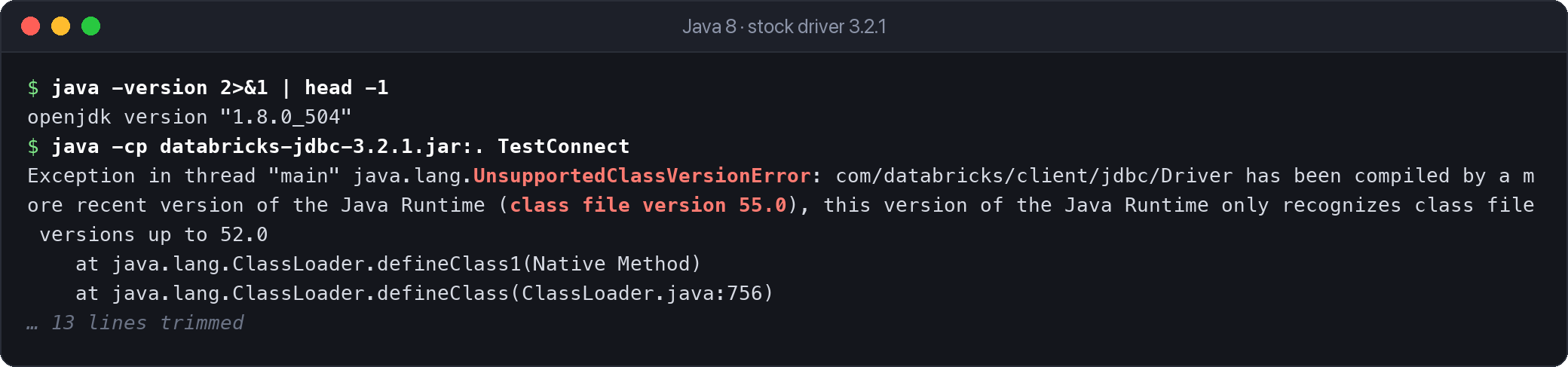
For the capture, run the stock driver on Java 11 or newer. DBeaver ships its own newer Java, which is why it worked there. We used Java 17 here.
The second is certificate revocation. The driver checks revocation by default, and mitmproxy's certificates don't name an OCSP responder, so the TLS handshake fails before any token request goes out:
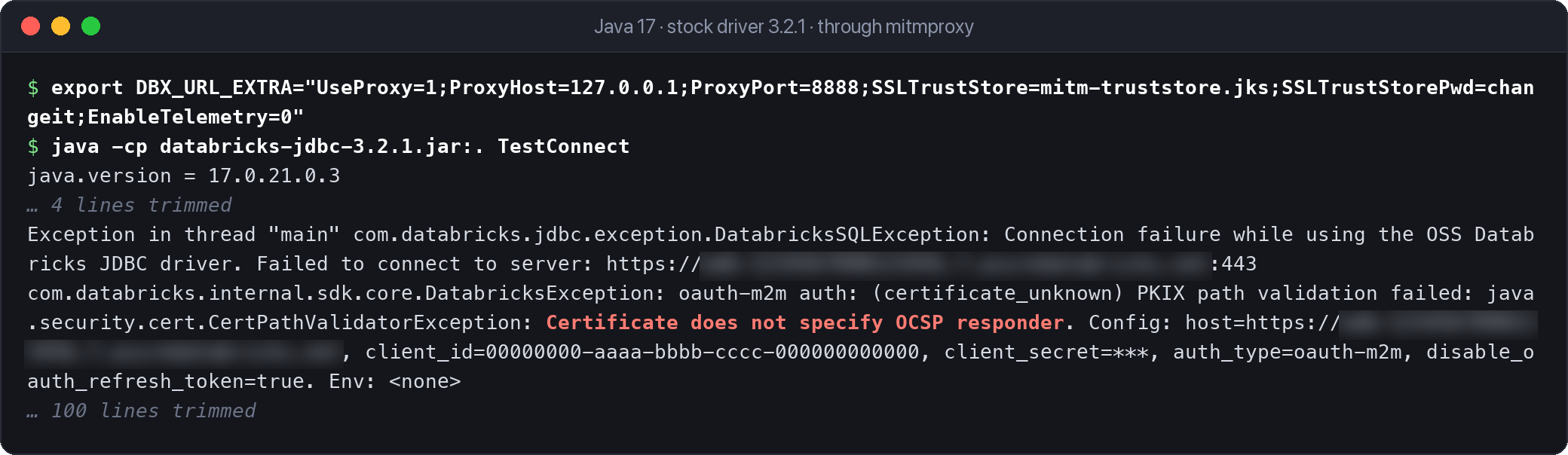
CheckCertRevocation=0 turns that check off. Only use it against the proxy. It never belongs in the Essbase URL.
What the capture showed
With both fixed, the driver fails with the same error we had in production:
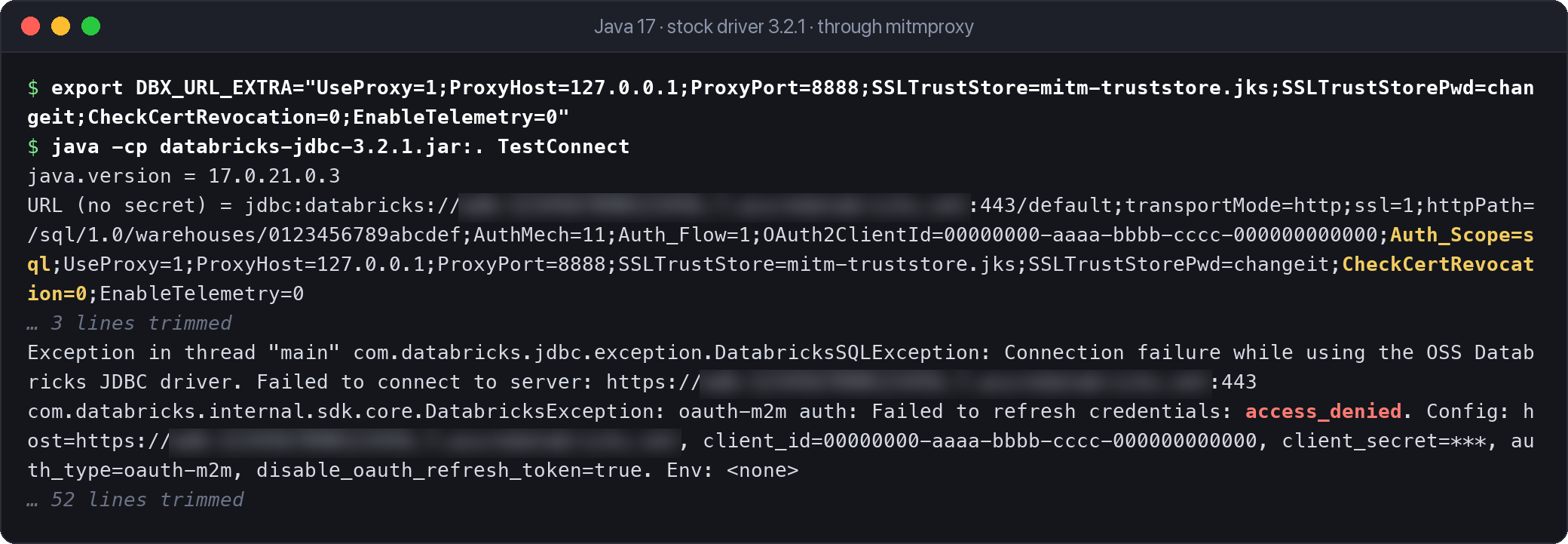
The URL says Auth_Scope=sql. The proxy showed what the driver sent to /oidc/v1/token:
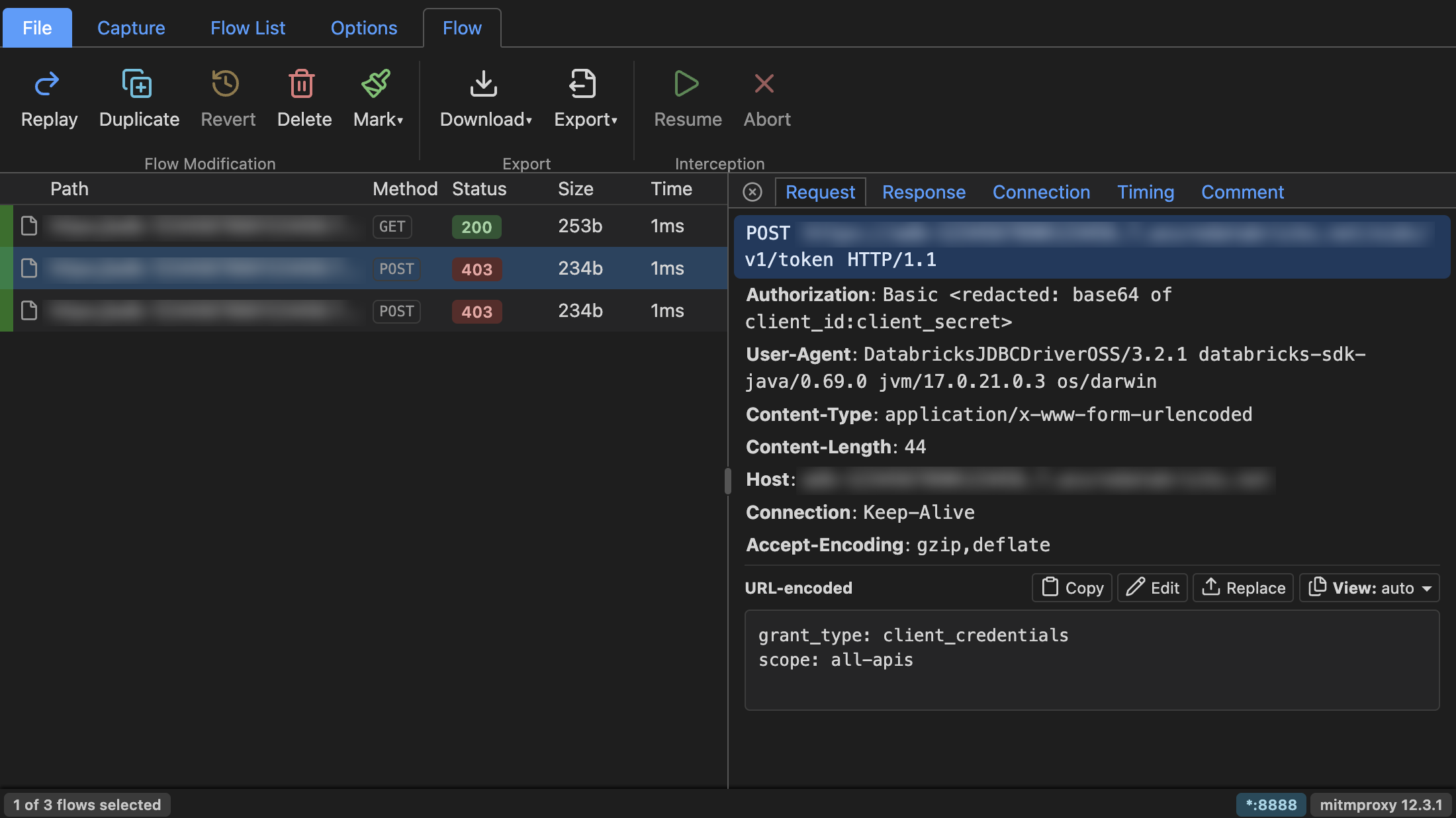
The body says scope: all-apis. The driver ignored our scope and asked for everything, and it tried twice. The response explained the 403:
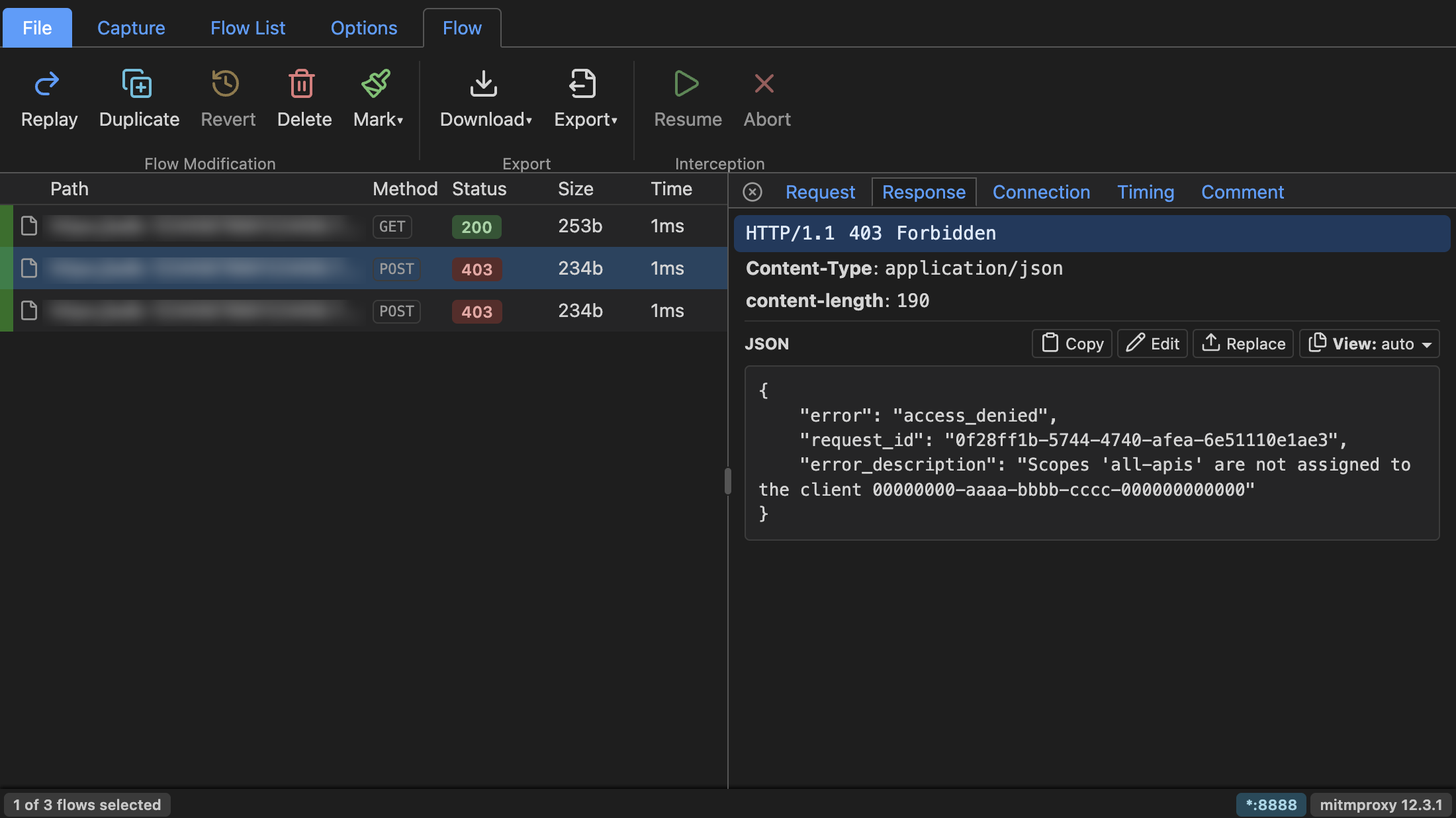
A 403 by itself suggests a permissions problem in Databricks. The capture showed the request was already wrong when it left the machine, so we stopped looking at Databricks and went into the driver code. Part 1 covers what we found there.
Building the jdk-8 branch
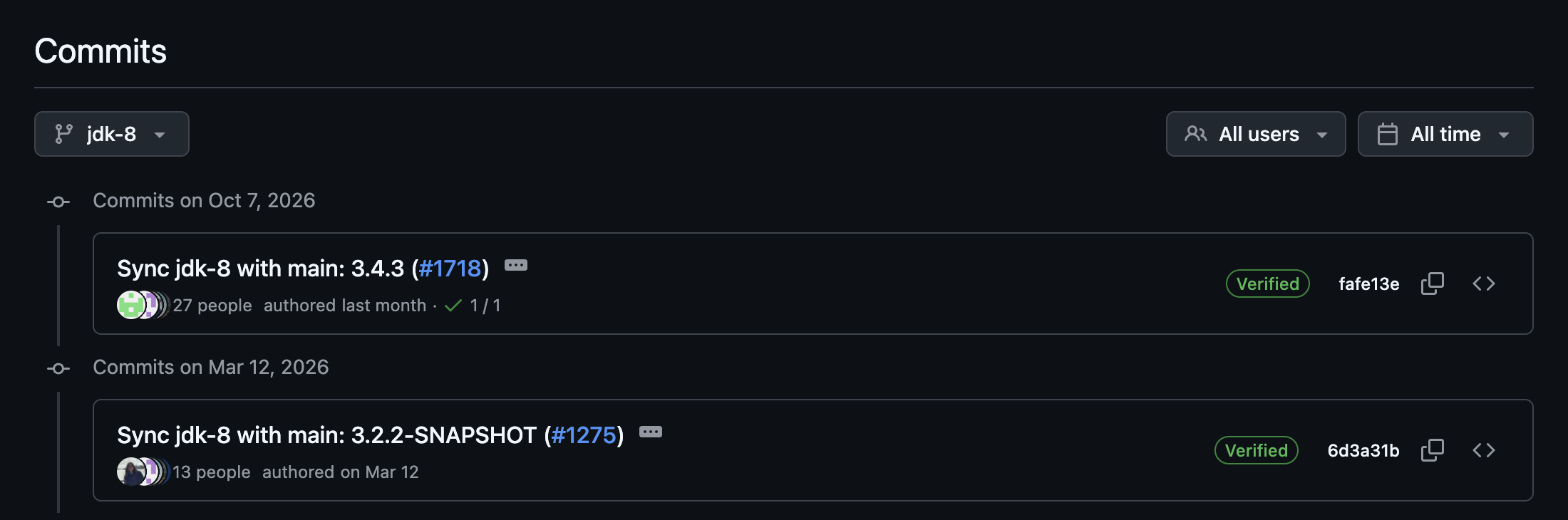
Databricks keeps a jdk-8 branch of the driver that compiles to Java 1.8. On 2026-10-07 they synced it to 3.4.3, and that sync brought in the Auth_Scope fix from PR #1707. They still don't publish a Java 8 JAR, so you build it yourself.
You need git, Maven and a JDK 8. We used Temurin 1.8.0_504 and Maven 3.10.0 on macOS. The companion script also uses Python 3 for one check.
Step 1: check the branch has the fix
Look at the commit history for jdk-8. The commit you want is fafe13e, "Sync jdk-8 with main: 3.4.3", or anything newer:
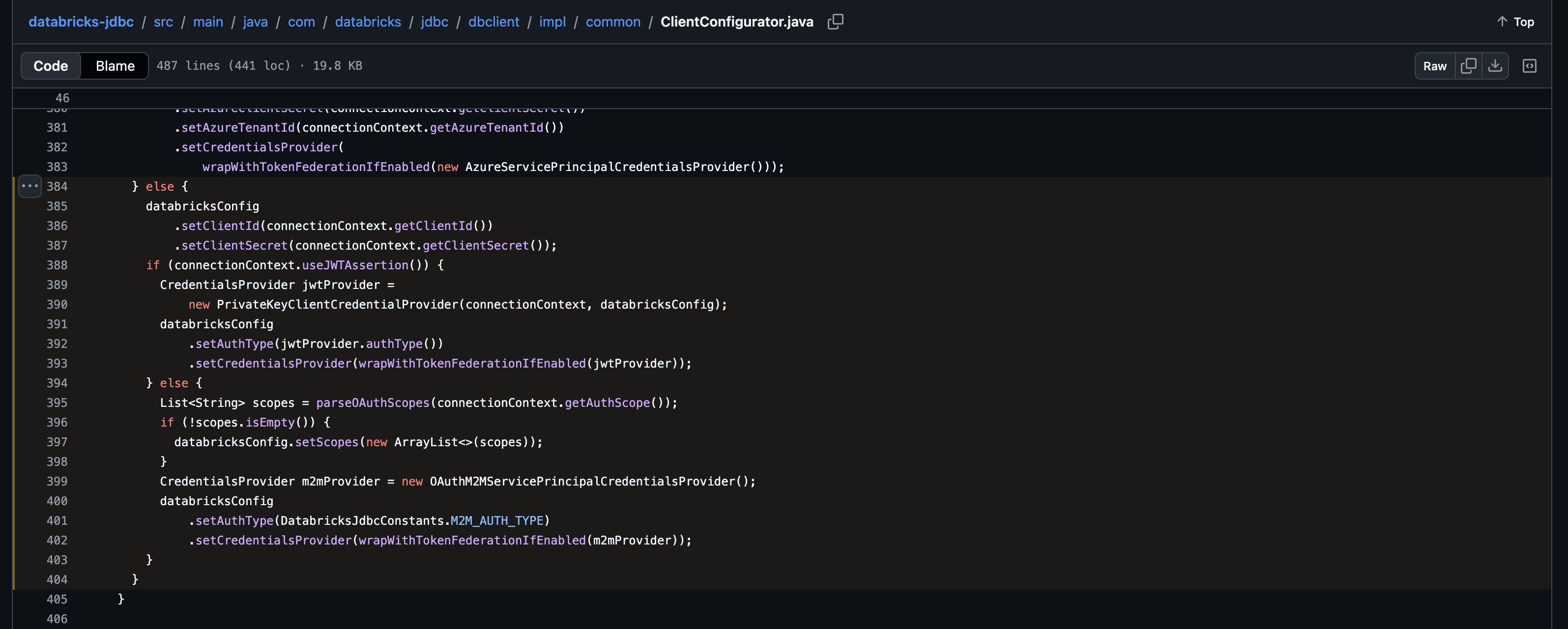
In ClientConfigurator.java the client-secret M2M path now parses Auth_Scope and calls setScopes. That's the call that was missing in the version we hit:
Step 2: point JAVA_HOME at JDK 8
Build with the same Java version Essbase runs. On macOS:
export JAVA_HOME="$(/usr/libexec/java_home -v 1.8)"
export PATH="$JAVA_HOME/bin:$PATH"
java -version
mvn -v
On Linux, set JAVA_HOME to your JDK 8 directory. mvn -v should report Java 1.8 too. If it reports something newer, Maven is using a different JDK than your shell.
Step 3: clone the branch
git clone --branch jdk-8 --single-branch https://github.com/databricks/databricks-jdbc.git databricks-jdbc-jdk8
cd databricks-jdbc-jdk8
git log -1 --format='%h %ad %s' --date=short
grep -n 'Auth_Scope' NEXT_CHANGELOG.md
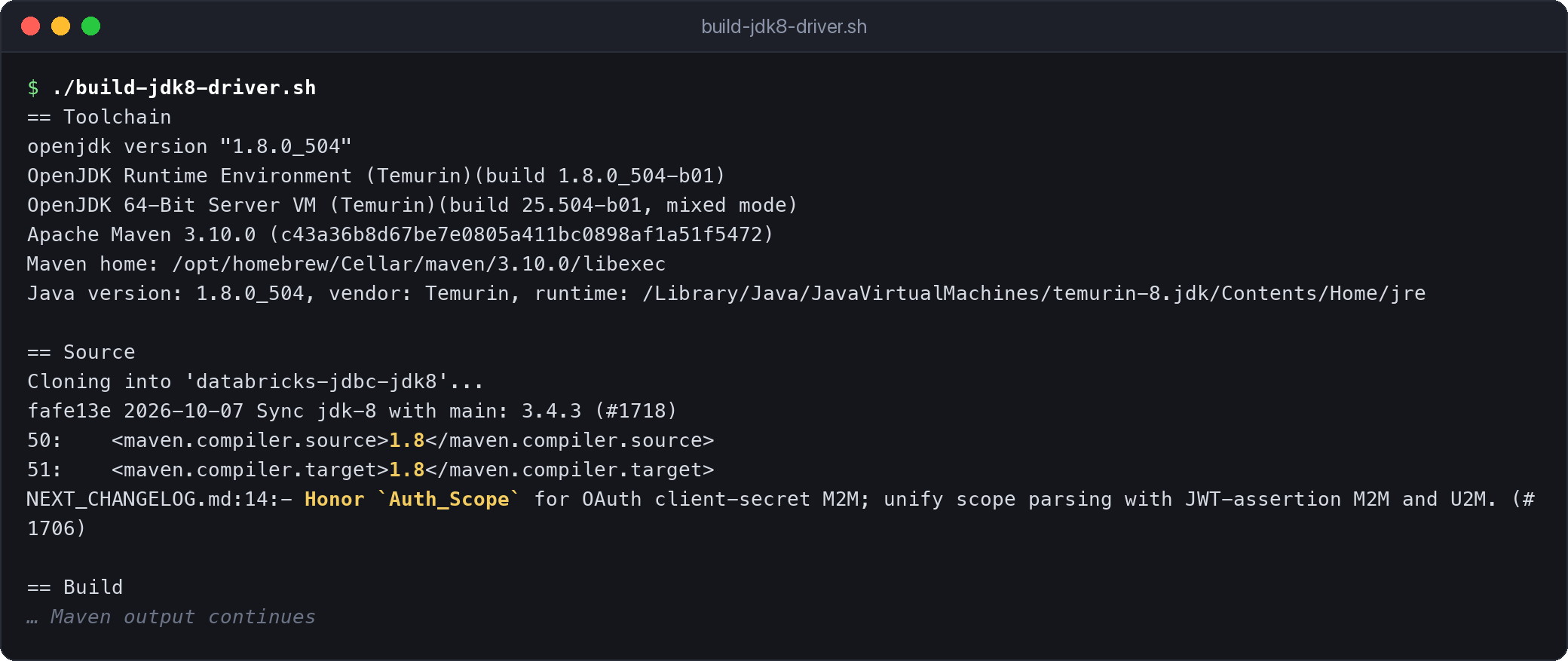
The changelog line is your second check that the fix is in the tree. The version in pom.xml reads 3.4.3, but the 3.4.3 on Maven Central is a different build. That one is Java 11 and doesn't have the fix.
The companion script runs every step in this section. Here is the start of its output:
Step 4: build
mvn -B -DskipTests clean packageIt took about a minute on our Mac. The first run takes longer while Maven downloads dependencies.
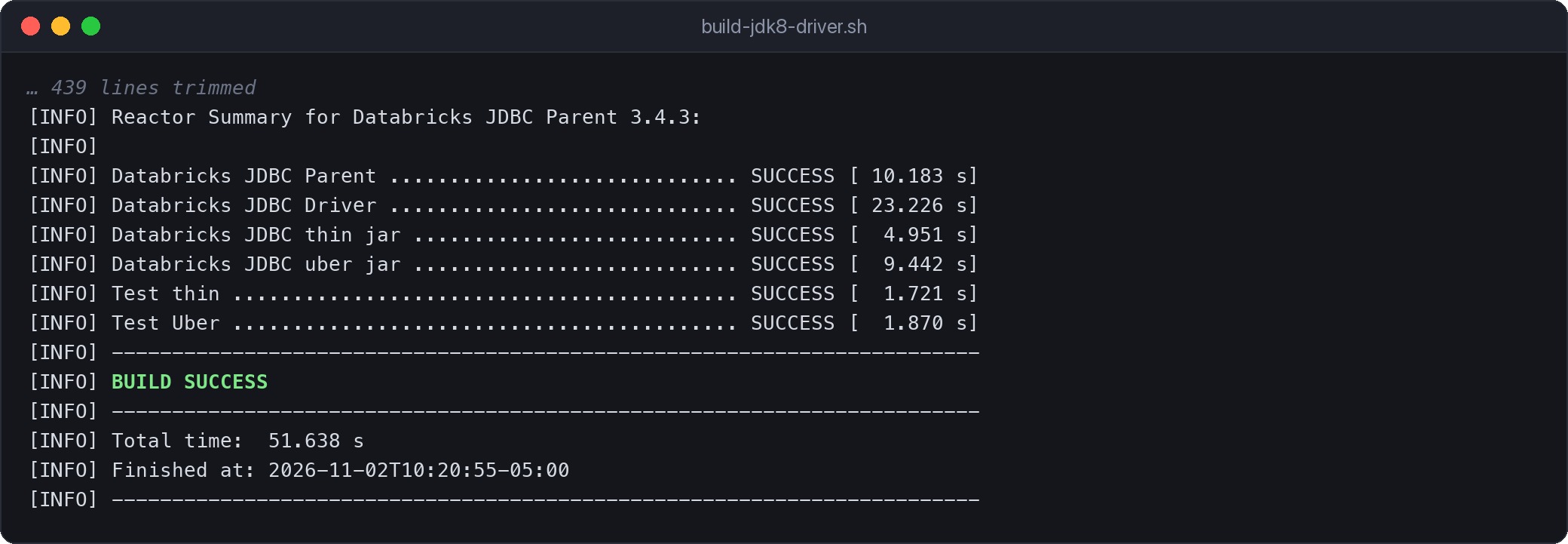
The JAR you want is assembly-uber/target/databricks-jdbc-3.4.3.jar, about 41 MB. It's the shaded build with the dependencies inside. Leave the thin JAR and the original- file alone.
We skipped tests to keep the build short, then ran the two test classes that cover scope handling, still on JDK 8:
mvn -B -pl jdbc-core test -Dtest='ClientConfiguratorTest,DatabricksConnectionContextTest' \
  -Dsurefire.failIfNoSpecifiedTests=false -Djacoco.skip=true
All 190 tests passed.
Step 5: prove it runs on Java 8
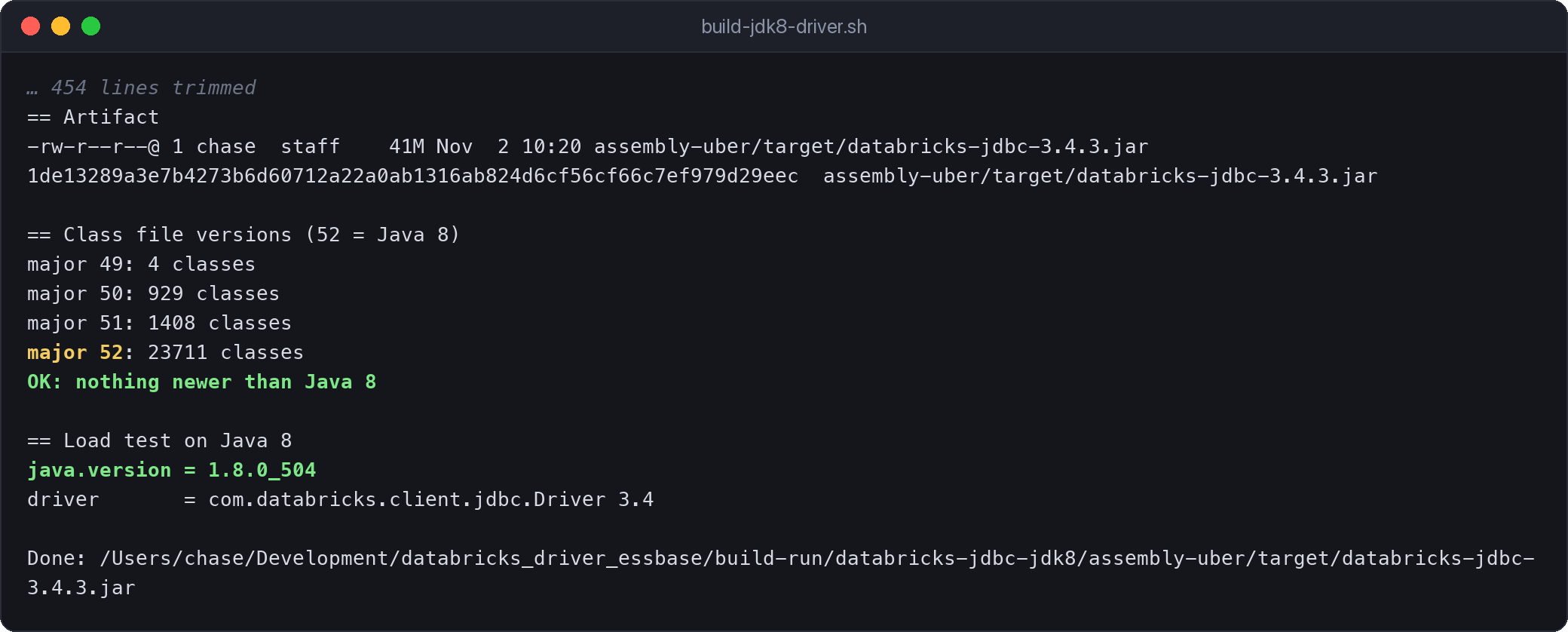
Compiling with JDK 8 isn't enough proof on its own, because shaded dependencies can bring in newer class files. The script reads the version bytes of every class in the JAR and fails if any is newer than 52, which is Java 8. Then it loads the driver on Java 8:
Step 6: run it through the proxy again
Run the same test through the proxy again, this time with the new JAR on Java 8:
java -cp databricks-jdbc-jdk8/assembly-uber/target/databricks-jdbc-3.4.3.jar:. TestConnect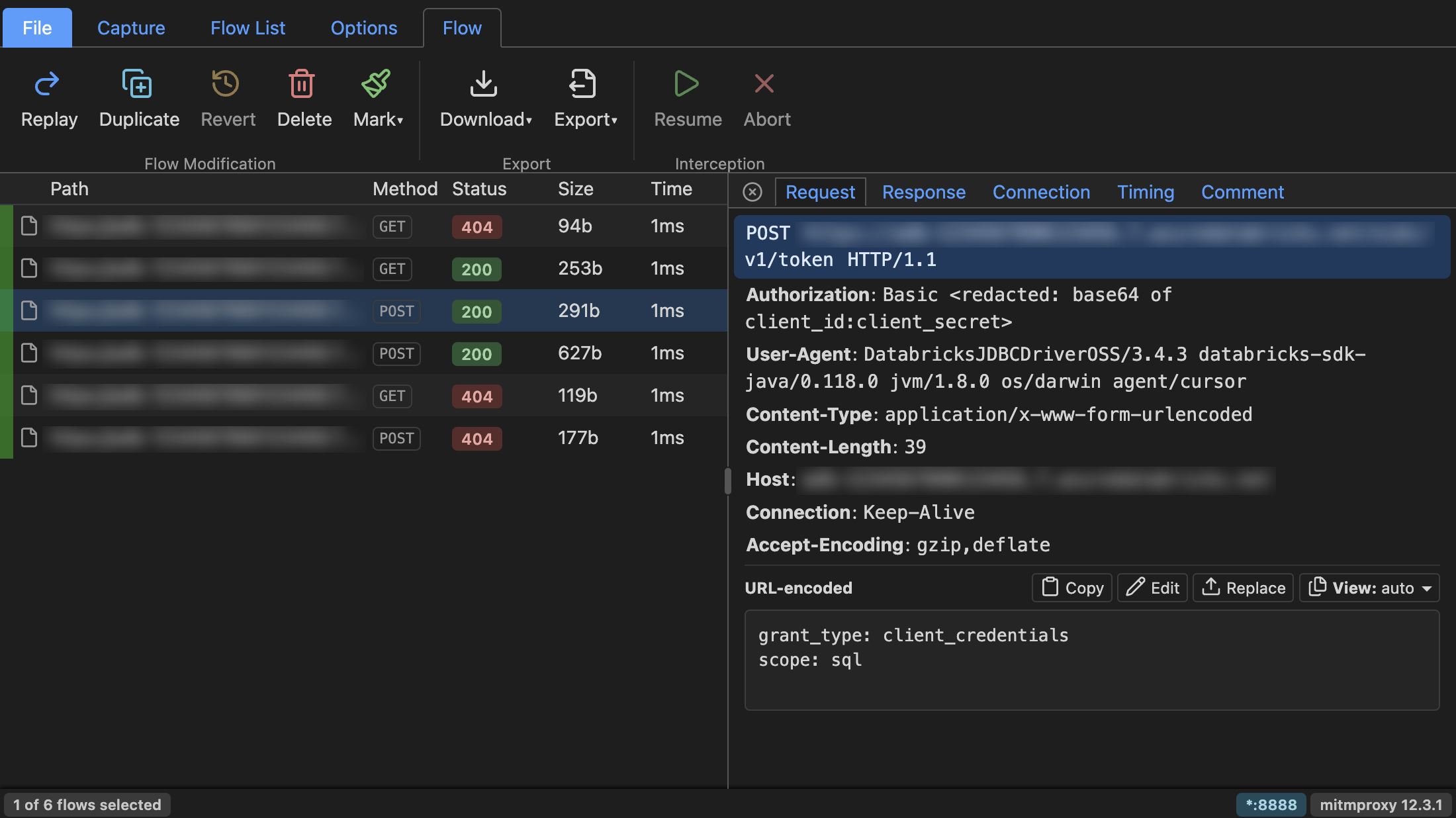
The token request now carries scope: sql, and the user agent shows jvm/1.8.0. The newer driver also makes a second token-exchange call, which carries scope=sql as well.
Deploying it
Deployment is the same as Part 1. Replace the old Databricks JAR on the Essbase classpath with databricks-jdbc-3.4.3.jar, and keep only one Databricks driver there. Use the URL with Auth_Scope=sql.
Before it goes to Essbase, take out every property you added for the capture: UseProxy, ProxyHost, ProxyPort, SSLTrustStore, SSLTrustStorePwd and CheckCertRevocation.
Things to watch for
Two clean builds on our Mac produced the same SHA-256, 1de13289a3e7b4273b6d60712a22a0ab1316ab824d6cf56cf66c7ef979d29eec. The project doesn't promise reproducible builds, so yours may differ on another JDK or OS. Trust the class version check and the proxy run more than the hash.
The jdk-8 branch moves when Databricks syncs it. Check git log and the changelog line before each build. The script prints a warning if the Auth_Scope entry is missing.
This is still a JAR you built yourself, not an official Databricks release. Keep the commit hash and the build log with it so you know what's running on Essbase.
The build script and TestConnect are in the companion repo.
Comments
Plain text only. No account needed — blank name shows as Anonymous. You can reply once under any top-level comment.
Loading…